How to Clean Up Your Digital Footprint

 30 min read
 On this page
To clean up your digital footprint, begin with a full audit, secure your accounts, delete unnecessary content, request third-party removals, and verify the results. Digital footprint cleanup involves reducing both active and passive data associated with your online identity. Active data includes information you share intentionally, such as posts and profiles, while passive data is collected without your direct input, like cookies and IP logs.
Cleanup can remove accounts you control, restrict privacy settings, and suppress outdated search results. However, it cannot erase all traces, such as archived content, news articles, or public records.
An exposed digital footprint poses risks in several areas like employment, education, personal relationships, and security. Employers and admissions officers frequently review online profiles, where negative content can impact opportunities. Personal details shared online can lead to scams or identity theft, while data aggregation by brokers increases doxxing threats. Therefore, digital footprint cleanup is decisive for maintaining privacy and protecting personal and professional interests.
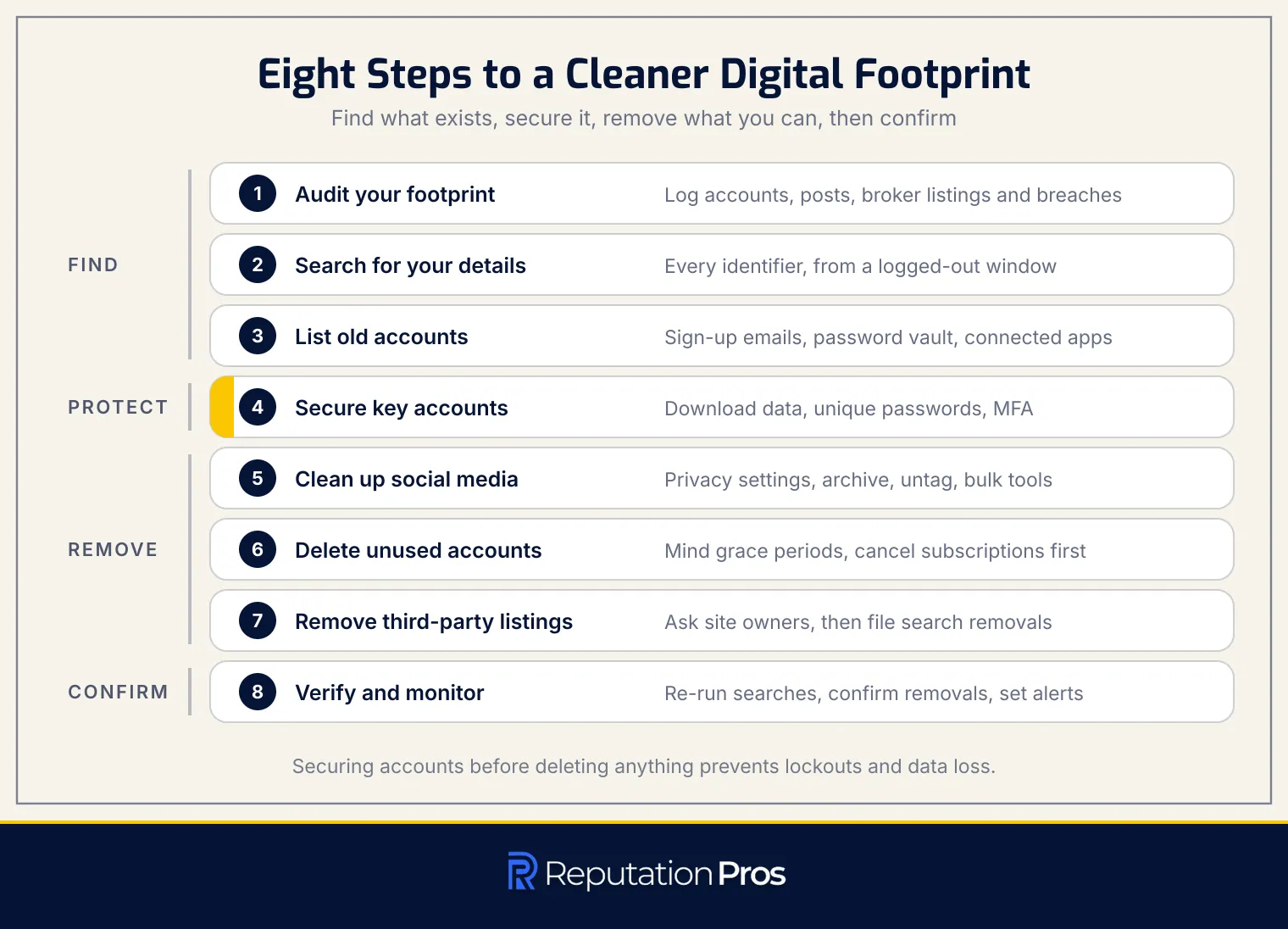
- Audit Your Digital Footprint Begin by identifying all online accounts, posts, data-broker listings, and potential breach exposures. Decide whether to keep, lock, or delete each item and track them using a system that includes platform, URL, action, and status.
- Search for Personal Information Conduct self-searches using name variants, email addresses, phone numbers, usernames, and home addresses. Perform these searches from a logged-out window to view results as an outsider would. Use search engines like Google, Bing, and DuckDuckGo.
- List Old Accounts and Content Identify old accounts by searching for sign-up and welcome emails in your inbox, checking password-manager vaults, and reviewing apps connected through third-party logins like Google or Facebook.
- Secure Important Accounts Before deleting anything, secure key accounts by downloading data, updating recovery information, setting unique passwords, and enabling multi-factor authentication (MFA). Account hardening prevents lockouts and data loss.
- Clean Up Social Media Adjust privacy settings, limit past posts, and use native tools to manage activity, such as Facebook’s “Manage Activity” or Instagram Archive. Untag yourself from unwanted content and consider using bulk cleanup tools.
- Delete Unused Accounts Deactivate or delete unused accounts, considering any grace periods and canceling subscriptions before deletion. Use directories like JustDeleteMe for guidance.
- Remove Third-Party Listings Request the removal of third-party listings by contacting site owners or filing search-engine removal requests. Understand the difference between de-indexing and deleting content at the source.
- Verify Cleanup and Monitor Re-run baseline searches to compare results against your audit tracker. Confirm broker removals, allow time for search engines to update, and set monitoring alerts through tools like Google Alerts.
A deeper audit includes using exact-match search operators, reverse image searches, and checking breach exposure with services like Have I Been Pwned. Address harder removal channels like cached pages and archived copies through search engine tools. Verification and a recurring monitoring schedule secure long-term results.
Prevention involves enhancing online privacy, securing accounts, and practicing good cyber hygiene. The cleanup process is beneficial for job seekers, parents managing a child’s footprint, and victims of doxxing or identity theft. Long-term maintenance involves regular self-searches, alert monitoring, and periodic privacy reviews, so that your digital footprint remains manageable.
1. Audit Your Digital Footprint Before Deleting Anything
To clean up your digital footprint, start by conducting a full audit. The audit involves identifying all online accounts, posts, data-broker listings, and any breach exposure. The goal is to determine whether to keep, secure, or delete each item. A digital footprint audit is a systematic review of all the digital traces you leave online, including both active and passive data. Active data includes social media posts and accounts, while passive data involves information collected without direct input, such as browsing history and data-broker listings. The audit cannot remove everything, especially copies held by others or public records, but it can help manage what you control.
The stakes of an exposed digital footprint are substantial, affecting hiring, admissions, relationships, and increasing risks of scams or social engineering. Therefore, the audit is decisive as it helps in creating a cleanup plan.
Use a tracker to document findings, including details like platform, URL, action (keep, secure, delete), and status. A structured audit approach keeps important data intact before backup and sets a baseline for measuring cleanup progress. After defining the audit scope, the next step is to perform a self-search to fill the tracker with visible information.
2. Search for Your Personal Information and Public Results
To clean up your digital footprint, start by searching for your personal information online. A baseline self-search uses several identifiers like name variants, email addresses, phone numbers, usernames, and your home address. Conduct these searches from a logged-out private window to see results as an outsider would, so that no personalized filters alter the visibility of your data.
- Google, Bing, and DuckDuckGo: Use these search engines to gather a full view of what is publicly available.
- Reverse Image Search: Utilize tools like Google Images to find where your photos appear online, which helps identify reused or misused images.
- Google “Results about you”: This tool surfaces search results containing your personal data, including your home address and phone number, and notifies you of any new matches.
By systematically logging each finding in an audit tracker, you can decide whether to keep, lock down, or remove the information, securing a thorough digital footprint cleanup.
3. List Your Old Accounts, Posts, and Shared Content
To clean up your digital footprint, it is decisive to list every old account, post, and shared content. A full inventory keeps anything from being missed during deletion or privacy review.
Begin by searching your email inbox for sign-up, welcome, verification, and password-reset messages. Sign-up and password-reset messages frequently reveal accounts that are easy to forget. Next, check your password manager for saved logins. Review apps connected through single sign-on options such as Google, Apple, or Facebook.
Log each discovery in the audit tracker with the platform name, URL or app name, the action you plan to take, and the current status. A structured inventory becomes the bridge between identifying your digital footprint and deciding what to secure, delete, or request for removal next.
4. Secure Important Accounts Before Cleanup
To secure important accounts before cleanup, start by downloading your account data. Downloading an archive first preserves every necessary record before any change takes effect. Use tools like Google Takeout to export and save your data.
Next, update your recovery email and phone number to maintain access to your accounts. Assign unique passwords to each account to prevent unauthorized access. Enable Multi-Factor Authentication (MFA) or use passkeys to add an extra layer of security. Account hardening is decisive to mitigate the risk of account lockout and data loss that can occur during the cleanup process.
Revoking access to third-party applications is another important measure. Revoked app permissions cut off unauthorized access through apps you no longer use or trust. By securing and backing up your accounts, you establish a stable foundation for further digital footprint cleanup. The approach makes certain that your accounts remain accessible and protected, allowing you to proceed with confidence in social media cleanup and account deletion tasks.
5. Clean Up Social Media Profiles With Native and Bulk Cleanup Tools
To clean up your digital footprint, optimizing social media profiles is decisive. Profile optimization involves adjusting audience settings, managing past posts, and utilizing both native and bulk cleanup tools. Facebook’s “Manage Activity” feature allows users to archive or delete posts in bulk, providing a convenient method to hide or remove content. Instagram’s Archive function enables users to remove posts from public view while retaining personal access.
Audience Settings and Past Posts Adjusting audience settings is necessary for controlling who can view your content. Limiting the visibility of past posts can protect your privacy and manage your online image. Tools like Facebook’s “Manage Activity” and Instagram’s Archive allow easy modification of audience settings and content visibility.
Archive vs. Delete Deciding between archiving and deleting content is important. Archiving hides content from public view but keeps it accessible for future reference, while deletion permanently removes it. The options offer flexibility in managing your digital footprint.
Untagging and Bulk Cleanup Tools Untagging yourself from photos and posts where you’re mentioned is important for managing your online presence. Bulk cleanup tools streamline this process, enabling efficient management of multiple posts. However, these tools have limitations, such as being unable to remove content shared by others or on third-party sites. For full cleanup, manual review and addressing each platform individually are necessary.
6. Delete Unused Accounts and Content You Control
To clean up your digital footprint, delete unused accounts and content you control after securing and backing up important data. Account deletion is necessary in managing your online presence by removing data from platforms where it is no longer needed.
Understanding the difference between deactivation and deletion is decisive. Deactivation temporarily hides your account but keeps your data stored on the platform’s servers, allowing reactivation later. In contrast, deletion is intended to be permanent, removing your account and data from the platform’s systems, although timelines and thoroughness can vary.
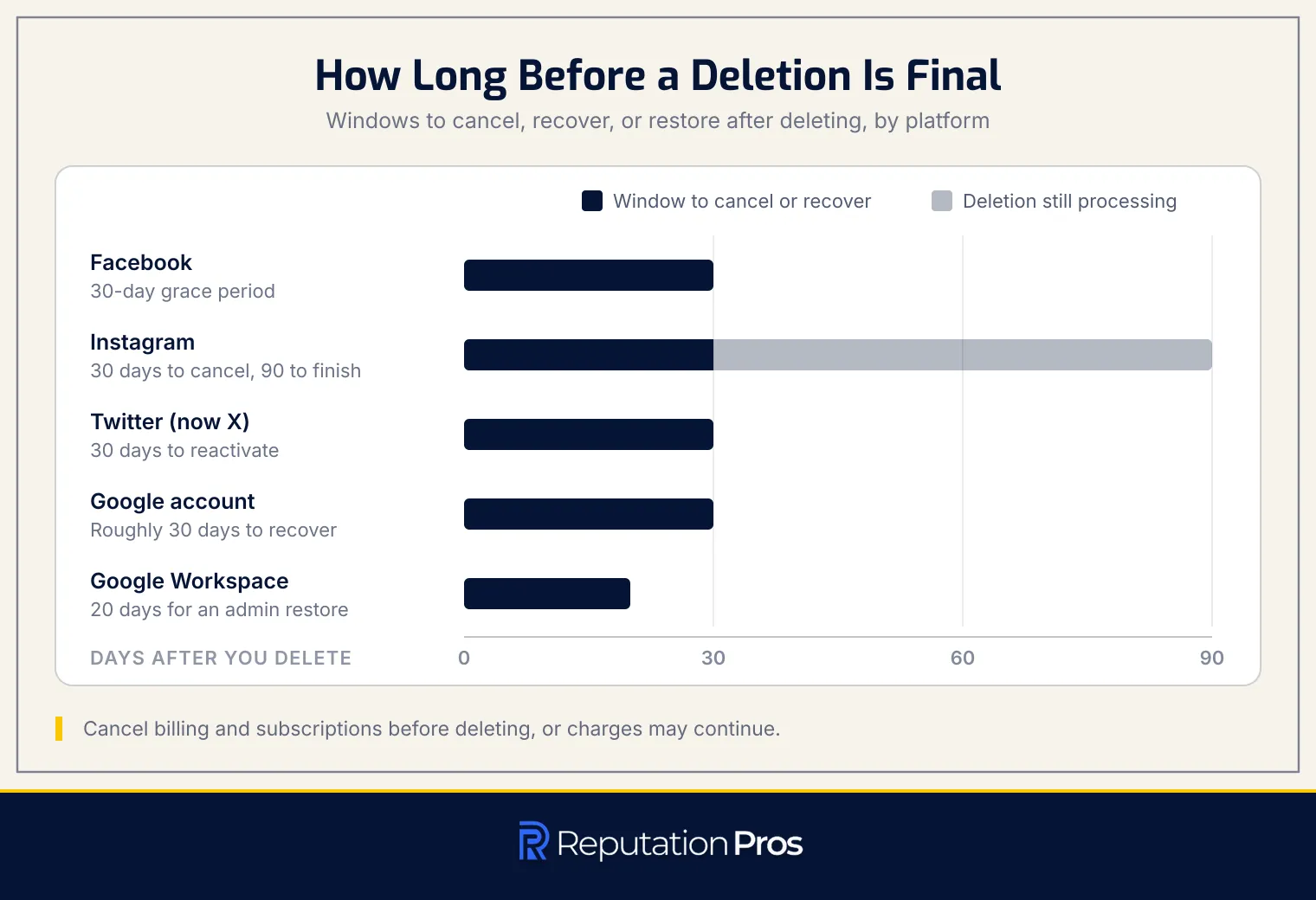
Platforms frequently provide deletion grace periods, allowing users to change their minds before permanent removal. For instance, Facebook offers a 30-day grace period during which logging back in cancels the deletion process. Instagram provides the same 30-day window, and completing the deletion can take up to 90 days after the process begins, according to “Permanently delete or deactivate your Instagram profile” in the Instagram Help Center. Twitter (now X) allows reactivation within 30 days of deactivation, after which the account is permanently deleted. Google gives consumer account holders roughly 30 days to recover a deleted account by verifying their identity; the 20-day window belongs to Google Workspace, where an administrator can restore a deleted user for that period only.
Canceling billing and subscriptions before deletion is decisive, as platforms may continue charging payment methods if subscriptions are not explicitly canceled. Review account settings for active subscriptions, cancel them, and confirm cancellation to avoid unwanted charges.
Using account-deletion directories like JustDeleteMe can simplify this process by providing direct links to deletion pages and rating the difficulty of account deletion for each platform. By systematically deleting unused accounts, respecting grace periods, and confirming that subscriptions are canceled, you reduce your digital footprint’s exposure and regain control over your online data.
7. Remove Third-Party Listings and Search Results
To effectively remove third-party listings and search results, begin by requesting removal from the site owner. Locate the website’s contact or privacy page to submit a specific removal request, detailing the exact URL and reasons for removal. If the site owner complies, proceed by filing search-engine removal requests to de-index the content. Use tools like Google’s “Remove outdated content” to handle pages no longer available or updated at the source.
De-indexing removes the link from search results, while the original page may still exist unless deleted by the host. Understanding the distinction between de-indexing and source deletion is decisive. De-indexing hides the result from search engines, but the content remains accessible via direct links unless removed by the site owner.
If direct requests fail, escalate through platform reporting channels or legal pathways, especially in cases involving sensitive data or privacy violations. Keep track of all removal requests and check periodically to confirm their effectiveness.
8. Verify Your Cleanup and Set Up Monitoring
To verify your digital footprint cleanup, re-run the initial searches used during your audit. The verification sweep covers your name variants, email addresses, phone numbers, usernames, and home address across search engines like Google, Bing, and DuckDuckGo, using a logged-out private window.
Compare the new results against your audit tracker to make certain deleted accounts and posts reflect the changes made, and confirm that third-party listings are removed or de-indexed. Verification also requires confirming each data-broker removal by revisiting the sites where opt-out requests were submitted, so that profiles no longer appear.
Allow time for search engines to re-crawl the web and update indexes, as outdated results may persist for a few days. Document the verification date and status in your tracker, noting any listings that still require action.
Setting up monitoring alerts is decisive for maintaining the cleanup results. Use Google Alerts to receive notifications when your chosen search terms appear in new content. Google’s “Results about you” feature can alert you to new appearances of your personal contact information. Schedule regular verification checks, such as monthly self-searches and quarterly data-broker scans, to catch relistings or new data leaks promptly. The routine makes certain your digital footprint remains under control over time.
What Does Digital Footprint Cleanup Mean?
Digital footprint cleanup involves systematically reducing publicly visible or easily accessible personal information online. A removal request aims for outcomes such as data deletion, privacy restriction, and suppression of search results. Digital footprint cleanup is not a one-time task; it is a recurring practice that requires ongoing monitoring and maintenance to address new data exposure as it arises.
The scope of digital footprint cleanup extends to both active and passive data. Active data includes information such as social media posts and account details, while passive data encompasses tracking cookies and IP logs. Although cleanup can effectively manage content you control directly, it cannot entirely remove information that has been distributed across third-party platforms or archived copies.
What Can Digital Footprint Cleanup Remove?
Digital footprint cleanup addresses several types of online content, each with different levels of removability. Below is a detailed table outlining what can be removed, partly removed, or not removed at all, along with the appropriate removal routes.
| Content Type | Example | Removable | Removal Route |
|---|---|---|---|
| Own posts and accounts | Social media posts, profiles, unused accounts | Yes | Delete the account or post at the source; platforms offer archive, privacy, or removal controls |
| Data-broker listings | People-search profiles with personal information | Yes | Opt-out at the broker site, complete identity checks, and monitor for relisting |
| Outdated search results | Links showing removed or changed content | Yes | Request a refresh or removal from the search engine; use tools like Google’s refresh/outdated-content workflow |
| Cached and archived copies | Stored search snippets, web snapshots | Partly | Request refresh/removal from the search engine for cached snippets; contact archive hosts for removal |
| Doxxing content | Exposed personal data such as address, phone number | Partly | Request removal from the site owner, use platform reporting, or legal takedown tools |
| News articles | Published articles naming individuals | Partly | Limited removal; may suppress search visibility or correct errors, but articles generally remain published |
| Court and public records | Court filings, property records, voter records | No/Partly | Typically cannot be deleted; some records may be sealed or corrected through legal channels |
| Copies shared by others | Reposted screenshots, mirrors, forwarded images | Partly | Remove the original where possible, request takedowns from hosts, and seek search-engine de-indexing |
Digital footprint cleanup can effectively remove or suppress content that you control, but cannot erase all traces once content is copied, indexed, archived, or legally published. Google’s tools can help refresh or remove outdated results, while data-broker opt-outs can reduce exposure on people-search sites. However, public records and redistributed copies frequently remain partly removable or not removable at all.
What Makes Up Your Digital Footprint?
A digital footprint consists of two primary components: active and passive data. Active digital footprint refers to information that individuals intentionally share online, such as social media posts, account registrations, and submitted reviews. An active footprint grows through deliberate actions and decisions made by the user.
In contrast, a passive digital footprint is formed from data collected without user intervention. A passive footprint holds cookies, IP address logs, and browsing history, which are automatically gathered by websites and applications. Data brokers frequently aggregate both active and passive data to create full profiles, which are then sold to marketers and other entities.
What Is an Active Digital Footprint?
An active digital footprint is created through intentional online interactions. An active footprint covers activities like posting on social media, leaving comments, filling out online profiles, signing up for accounts, and writing reviews. The actions are deliberate and visible, distinguishing them from passive data collection, which occurs without direct user input.
What Is a Passive Digital Footprint?
A passive digital footprint consists of information collected about an individual without their direct, intentional action or explicit consent. A passive digital footprint accumulates automatically through mechanisms such as cookies that track browsing behavior, IP address logs that record network locations, and advertising trackers embedded in websites and apps. Data brokers frequently aggregate passive data from multiple sources to create full profiles. Unlike active digital footprints, which result from deliberate actions like posting or sharing, passive footprints accumulate invisibly as users navigate online environments.
Which Parts of Your Digital Footprint Can You Control?
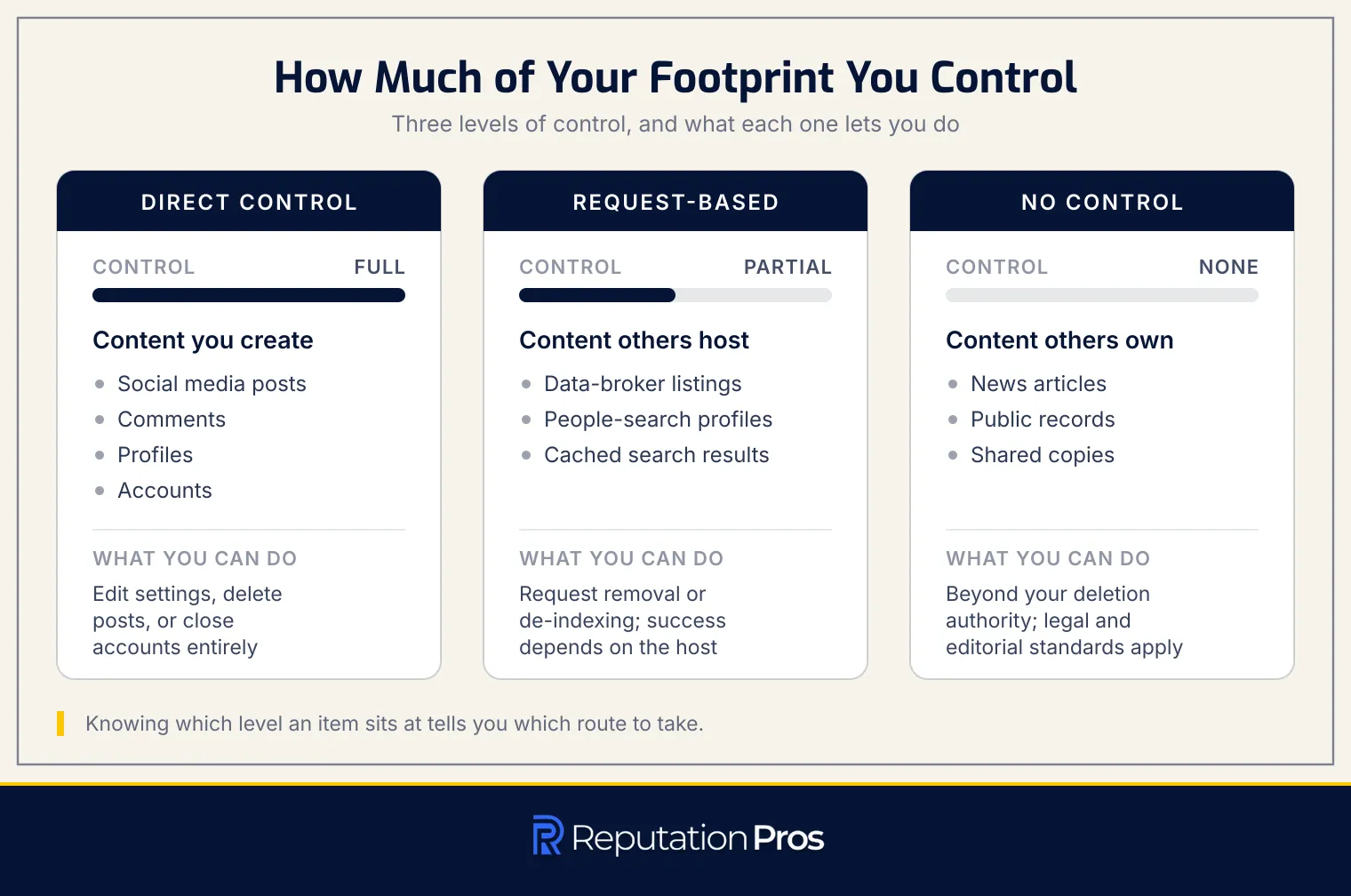
Your digital footprint is composed of components that you can control to varying degrees. Understanding these control boundaries is necessary for effective management.
- Direct Control: You have full authority over content you create directly, such as social media posts, comments, profiles, and accounts. Direct control lets you edit settings, delete posts, or close accounts entirely.
- Request-Based Control: Request-based control covers information hosted by others, like data-broker listings, people-search profiles, and cached search results. You can request removal or de-indexing, but success depends on the host’s compliance and legal frameworks.
- No Control: Content owned by others, such as news articles, public records, and shared copies, falls beyond your deletion authority. Legal and editorial standards frequently protect these items from individual removal requests.
Understanding these categories helps in strategizing your digital footprint cleanup and maintenance efforts.
Why Does Your Digital Footprint Matter?
A digital footprint carries substantial weight in several aspects of life, impacting hiring, admissions, relationships, and security.
Hiring and Admissions Screening: A 2018 CareerBuilder survey conducted by The Harris Poll found that 70% of employers research candidates on social media, and 57% found content that caused them not to hire someone. Admissions officers are increasingly adopting similar practices, reviewing applicants’ online presence to gauge character and judgment beyond academic performance.
Relationships and Reputation: Online profiles, past posts, and tagged photos shape public perceptions and influence personal and professional relationships. An inappropriate post or controversial opinion can damage one’s reputation before any personal interaction occurs.
Scams and Social Engineering: Fraudsters exploit overshared data, such as hometowns and family names, to craft convincing phishing attacks and impersonation schemes. Consumers reported losing more than $12.5 billion to fraud in 2024, a 25% jump over the prior year, according to “New FTC Data Show a Big Jump in Reported Losses to Fraud to $12.5 Billion in 2024” by the Federal Trade Commission, March 2025, with social media the contact method behind the largest share of reported losses.
Identity Theft and Doxxing: Exposed personal details like phone numbers and addresses facilitate identity theft and doxxing, leading to harassment and financial fraud. Data brokers aggregate active and passive digital data into full profiles, making individuals vulnerable to malicious actors.
How Do You Audit Your Digital Footprint Thoroughly?
Auditing your digital footprint thoroughly involves several detailed steps to make certain all personal data exposure is identified and managed. Here are the layers a thorough audit adds beyond basic steps:
-
Exact-Match and Operator Searches: Conduct searches using exact-match quotes around your name, email addresses, and phone numbers. Use advanced search operators like site: to explore specific platforms and domains for any mention of your personal information.
-
Connected-App and Data-Broker Scans: Review permission settings on platforms like Google, Facebook, and Apple to identify connected apps and third-party services that have access to your accounts. Check data-broker and people-search sites such as Spokeo, Whitepages, BeenVerified, and Radaris for unauthorized listings.
-
Breach-Exposure Checks: Use services like Have I Been Pwned and Google Password Checkup to identify if any of your email addresses, passwords, or phone numbers have been compromised in data breaches. A breach check helps prioritize which accounts require immediate attention and security updates.
-
Status Entry for Every Find in the Tracker: Maintain a full audit tracker with columns for platform, URL, content type, action (keep, lock, or delete), and current status. The tracker serves as your cleanup roadmap and keeps every account, listing, and data point in view as you proceed with securing accounts, deleting content, and requesting removals.
How Should You Search for Yourself Online?
Searching for yourself online is a decisive step in managing your digital footprint. A self-search involves several key actions to secure full results.
-
Build an Identifier List: Start by compiling a list of all name variants you have used, including full names, nicknames, maiden names, and any common misspellings. Include email addresses, phone numbers, usernames, and home addresses.
-
Use Private Browsing: Conduct searches from a logged-out, private browsing window. The approach makes certain you see results as a stranger would, without personalization affecting the outcome.
-
Search with Exact-Match Quotes: Use exact-match quotes around your name (e.g., “John Smith”) to find precise matches. Combine these with the site: operator to narrow searches to specific platforms (e.g., “John Smith” site:facebook.com).
-
Utilize Multiple Search Engines: Run searches across Google, Bing, and DuckDuckGo. Each engine indexes differently, so using all makes certain no results are missed.
-
Perform Reverse Image Searches: Use tools like Google Images, Bing Visual Search, or TinEye to upload profile photos. A reverse image search identifies where your images appear online.
-
Document Findings: Log all findings in an audit tracker, noting the platform, URL, and any actions needed. A written record of findings is decisive for ongoing digital footprint management.
How Do Data Breach Alerts Reveal Digital Footprint Risks?
Data breach alerts reveal digital footprint risks by identifying exposed personal information such as emails, passwords, and phone numbers. The alerts prioritize password rotation, starting with email and financial accounts, to mitigate potential security breaches. Tools like Have I Been Pwned and Google Password Checkup help users check if their credentials have been compromised in known data leaks, guiding them to secure their digital footprint effectively.
How Do You Remove Third-Party Content?
Removing third-party content from the internet involves a series of structured actions. Each step is decisive for effectively managing your digital footprint.
Identify the Host Site The first step is to determine which website or platform is hosting the unwanted content. Host identification means noting the exact URL and the type of content, such as a forum post or news article comment.
Request Removal from the Site Owner Contact the website’s administrator or content owner using their official contact form or support email. State your request for removal in plain terms, providing the specific URL and explaining your reasons, such as privacy concerns or inaccuracies.
Escalate Through Platform Reporting or Legal Routes If the site owner does not comply, use the platform’s reporting tools for privacy violations or harassment. For content violating laws or containing sensitive data, invoke legal rights like GDPR Article 17 or CCPA/CPRA deletion rights.
Request Search-Engine Removal Once the Source Changes After the content is deleted or restricted at its source, submit a removal request to search engines to de-index the outdated result. Use tools like Google’s “Remove outdated content” feature or Bing’s Content Removal tool. Track each request to make certain the search result no longer appears.
How Do You Remove Cached Pages?
Removing cached pages from search engines involves specific steps due to changes in how search engines handle cached content. Google retired its public cache links during 2024, a change Google Search Liaison Danny Sullivan confirmed in February 2024, so managing outdated search results now depends on the Refresh Outdated Content tool.
Step 1: Use Google’s Refresh Outdated Content Tool To remove outdated Google search results, use the “Remove Outdated Content” tool. Submit the URL of the page that has been updated or deleted. Google will prioritize re-crawling the page to update its search index, replacing the old cached version with the current page state.
Step 2: Submit Removal Requests to Bing For Bing, access the Bing Content Removal tool through Bing Webmaster Tools. Submit the specific URL you wish to refresh. Bing will review the request and update its cache, so that outdated information is removed from its search index.
Step 3: Allow Time for Re-Indexing Once requests are submitted to both Google and Bing, allow time for the search engines to re-crawl and update their indexes. Re-crawling can take several days to weeks, depending on the site’s crawl priority and the search engine’s schedule.
Step 4: Verify the Cache Update After sufficient time, search for the page again to confirm that the outdated cached content has been removed from search results. If the old version persists, consider resubmitting your request or checking if the source page has been correctly updated or removed.
By following these steps, you can effectively manage and remove outdated cached pages from search engine results, so that only current and relevant information is displayed.
How Do You Remove Archived Copies?
To remove archived copies, begin by identifying the specific snapshot URLs of the content you wish to remove. Snapshot documentation is decisive because it lets you target the exact archived material for removal. The Internet Archive, including its Wayback Machine, is a common platform where these snapshots are stored. Once you have the URLs, you need to file a removal request with the archiving service.
Filing a Removal Request Submit a detailed removal request to the archive operator. The request should include the snapshot URLs and a clear justification for removal. Justifications may include proof of ownership or personal-data concerns. If the archived content contains sensitive personal information, state how it poses privacy or safety risks. Supporting evidence strengthens your request and increases the likelihood of approval.
Confirming Exclusion After submitting the request, monitor the archive to confirm that the snapshots have been removed. Verification means revisiting the URLs to confirm they no longer appear in the archive. Keep in mind that processing times for removal requests can vary. Document each request in an audit tracker, noting the submission date, URLs, and current status. A logged request history tracks progress and keeps the archived copies inaccessible.
How Do You Remove Your Information From Data Brokers and People-Search Sites?
Removing your information from data brokers and people-search sites involves a systematic process. An opt-out sequence makes certain that your personal data is less accessible to third parties. Follow the steps below to effectively opt-out:
Step 1: Identify Your Listings Start by searching for your name, phone number, and address on major people-search sites like Spokeo, Whitepages, BeenVerified, and Radaris. A search across those sites shows where your information is listed.
Step 2: Locate Opt-Out Pages Each site usually has an opt-out page found in the footer or help section. Navigate to these pages to begin the removal process.
Step 3: Submit Removal Requests Provide only the minimal required information to verify your identity and locate your listing. Avoid sharing additional personal data to prevent new records from being created.
Step 4: Complete Identity Checks Many sites require identity verification, which could involve email confirmation, photo ID upload, or address matching. Complete these checks promptly to avoid delays.
Step 5: Invoke Legal Deletion Rights If applicable, use legal rights under GDPR Article 17 for EU residents or the CCPA/CPRA for California residents to strengthen your request. Article 17 of Regulation (EU) 2016/679 grants a right to erasure “without undue delay” on grounds including withdrawn consent and unlawful processing, and the California Privacy Protection Agency sets out the parallel deletion right in its CCPA regulations.
Step 6: Use the California Delete Act (DROP) For California residents, the Delete Act allows a single deletion request to reach every registered data broker through the Delete Request and Opt-Out Platform, which CalPrivacy opened to consumers on January 1, 2026; registered brokers must check the platform and process verified requests on a 45-day cycle from August 1, 2026.
Step 7: Track Your Requests After submission, save confirmation emails and log the date, broker name, listing URL, and status in an audit tracker. A logged submission history monitors progress and identifies brokers that fail to honor removal requests.
By following these steps, you can effectively manage your digital footprint and enhance your online privacy.
How Do You Submit and Track Data-Broker Opt-Out Requests?
Submitting and tracking data-broker opt-out requests is a decisive step in managing your digital footprint. Broker opt-out makes certain your personal information is not readily available through data brokers.
Save Confirmation Emails After submitting an opt-out request, save all confirmation emails. Confirmation emails serve as proof of submission and frequently contain important reference numbers or links.
Complete Identity Verification Many data brokers require identity verification. Verification can involve email confirmation links, SMS codes, or uploading government-issued IDs. Respond promptly to each verification request to prevent expiration.
Log Details in an Audit Tracker Record each request’s details in an audit tracker. Include the broker’s name, submission date, confirmation number, verification status, and expected completion date. A per-broker record tracks progress and avoids duplicate efforts.
Schedule Relisting Re-checks Data brokers can repopulate removed listings. Set reminders to check broker sites at regular intervals, such as 30, 60, and 90 days post-removal, and then quarterly. If your data reappears, submit a new request.
Weigh DIY Against Paid Services DIY opt-outs are free but time-consuming. Consider paid services like DeleteMe or Privacy Bee, which automate submissions and monitoring. However, these services may not cover all brokers, so verify their effectiveness through spot-checks in your tracker.
How Do You Verify That Digital Footprint Cleanup Worked?
To verify that your digital footprint cleanup worked, re-run the baseline searches initially used during the audit. The baseline re-run uses your name variants, email addresses, phone numbers, usernames, and home address in private browsing windows across search engines like Google, Bing, and DuckDuckGo. Conduct reverse image searches to make certain any visual data is no longer publicly visible.
Compare the new search results against your audit tracker to confirm that items marked for deletion or privacy restriction have been effectively removed. Ensure that deleted accounts no longer appear in search results and that social media posts made private are inaccessible. Check each data-broker site like Spokeo, Whitepages, and BeenVerified to confirm that your information has been removed and has not reappeared. Save confirmation emails and update your tracker with the verification date and status.
Allow time for search engines to re-crawl and update their indexes. If outdated results persist, use tools like Google’s Refresh Outdated Content to expedite the process. Once verification is complete, establish a recurring monitoring schedule to make certain results remain current and any new exposures are promptly addressed.
How Often Should You Monitor Your Digital Footprint?
Monitoring your digital footprint should be a continuous process to maintain privacy and security. The recommended frequency for several checks is outlined in the table below.
| Check | Recommended Frequency | Tool or Method |
|---|---|---|
| Self-search | Monthly | Search your name, emails, phone numbers, usernames, and images in logged-out/private browsing mode |
| Search alerts | Continuous | Google “Results about you” notifications; Google Alerts for broader mentions |
| Breach alerts | Continuous / when notified | Have I Been Pwned monitoring or account-breach notifications |
| Data-broker relisting check | Every 3 to 6 months | Re-check people-search sites and opt-out status |
| Privacy-settings review | Quarterly | Review social media, account privacy, app permissions, and recovery info |
The schedule makes certain that any new exposures are quickly identified and addressed, while periodic reviews confirm that previous cleanup efforts remain effective. The National Cybersecurity Alliance recommends reviewing and adjusting privacy settings once every three months in its guidance “Tread Lightly Online: How to Check and Manage Your Digital Footprint,” which anchors the cadence above.
How Does Online Privacy Reduce Future Data Exposure?
Online privacy reduces future data exposure by implementing several key strategies. The strategies include adjusting platform privacy settings, minimizing data shared during account sign-up, managing app permissions, removing photo location metadata, and controlling trackers and cookies.
Platform privacy settings allow users to determine who can view their posts, profile details, and activity. By sharing minimal data at sign-up, such as using aliases or temporary email addresses, users protect their primary identity. App permissions should be audited to restrict unnecessary access to contacts, location, or camera. Removing location metadata from photos makes certain GPS coordinates do not reveal private locations. Tracker and cookie controls in browser settings prevent advertisers and data brokers from collecting browsing data. By adopting these privacy measures, users can sharply limit the amount of personal information available to third parties, reducing the risk of data exposure.
How Does Account Security Protect Your Digital Footprint?
Account security protects your digital footprint by preventing unauthorized access that could lead to identity theft or data breaches. Unique passwords managed through a password manager make certain each account remains secure. Multi-factor authentication (MFA) or passkeys add an additional layer of protection, sharply reducing the risk of account takeover. MFA is exceptionally effective: it blocks over 99.9% of account compromise attacks, according to “Your Pa$$word doesn’t matter” by Alex Weinert, Microsoft Identity Security, 2019.
Login alerts provide immediate notifications of suspicious activities, allowing users to respond swiftly. Recovery options, such as updated email addresses and phone numbers, make certain that users can regain access to their accounts if needed. Together, these measures safeguard personal data and maintain the integrity of your digital footprint.
How Does Cyber Hygiene Prevent New Personal Data Exposure?
Cyber hygiene prevents new personal data exposure by establishing consistent digital habits that reduce vulnerability to unauthorized data access. Keeping software updated is necessary, as updates close security gaps that attackers might exploit. Practicing phishing awareness involves scrutinizing email sender addresses and avoiding clicking on suspicious links. Limiting the sharing of personal information online minimizes the risk of identity theft or social engineering. Using email aliases for less trusted services helps shield your primary inbox from spam and data brokers. Exercising caution on public Wi-Fi networks by avoiding sensitive transactions unless using a VPN protects your data from interception.
Incorporating the practices above transforms digital footprint cleanup from a one-time task into a continuous routine. On a set cadence, updating software, being vigilant against phishing attempts, and minimizing personal data sharing create a strong defense against data exposure. An ongoing maintenance routine keeps your digital footprint minimal, reducing the likelihood of future breaches. By integrating the habits into daily activities, you maintain a cleaner digital presence and protect your personal information from potential threats.
How Should Job Seekers Review Their Online Presence?
Job seekers must carefully review their online presence to align with professional goals. A pre-interview audit involves several steps to make certain that profiles and content reflect the desired career image.
- Check Recruiter-Visible Profiles: Ensure that profiles on platforms like LinkedIn are visible to recruiters. Recruiter visibility depends on the correct privacy settings and discreet use of the “Open to Work” feature.
- Align Profile Details with the Résumé: Make sure that job titles, employment dates, and accomplishments on professional profiles match the information on the résumé to avoid inconsistencies.
- Review or Limit Older Public Posts: Examine past social media posts, comments, and activities. Remove or limit the visibility of any content that may not align with current professional aspirations, such as controversial opinions or informal photos.
- Tighten Search Results: Use relevant keywords to enhance the visibility of desirable information in search results. Adjust privacy settings to control what potential employers can see, so that only pertinent details are accessible.
By following these steps, job seekers can present a professional and cohesive online image that supports their career objectives.
How Can Parents Reduce a Child’s Digital Footprint?
Reducing a child’s digital footprint involves several proactive measures to secure their online privacy and safety. The following strategies help parents manage and minimize their child’s digital presence effectively:
- Limit Sharenting: Sharenting refers to parents sharing content about their children on social media. Evaluate the necessity of each post before publishing, avoiding full names, ages, and identifiable information. Opt for private sharing options with family rather than public posts.
- Strip Photo Location Metadata: Photos frequently contain embedded GPS data that can reveal locations. Use tools or settings on smartphones to remove location metadata before sharing images online. Stripped metadata prevents exposing a child’s frequent locations.
- Adjust School and App Privacy Settings: Review and manage privacy settings on school portals and educational apps. Limit the visibility of personal information and opt out of non-essential data sharing. On a set cadence, audit app permissions to make certain they align with privacy preferences.
- Request Deletion of a Child’s Data: Under the Children’s Online Privacy Protection Act (COPPA), parents can review the personal information a service has collected about a child under 13 and demand its deletion, a right the Federal Trade Commission sets out in its “Complying with COPPA: Frequently Asked Questions” business guidance. Contact the service provider directly to enforce the right, so that the child’s information is removed from databases.
By implementing these measures, parents can sharply reduce their child’s digital footprint, safeguarding their personal information and privacy online.
What Should You Do After Doxxing or Identity Theft?
When faced with doxxing or identity theft, immediate action is decisive to mitigate harm. The following steps provide a structured approach to recovery and protection.
Keep a Detailed Evidence Log Start by documenting all instances of exposed information. Take screenshots of webpages, note URLs, and save any relevant messages or account changes. Captured evidence is necessary for reporting and legal actions.
Report to Affected Platforms Notify each platform where your information was shared. Use their reporting tools to flag privacy violations and save all confirmation details, such as case IDs or emails. Saved case IDs confirm that your reports are processed and followed up.
File an Identity Theft Report Visit IdentityTheft.gov to file an official report with the Federal Trade Commission (FTC). The FTC’s own identity-theft guidance treats the resulting Identity Theft Report as the record creditors and law enforcement rely on when disputing fraudulent accounts and charges.
Place Credit Freezes Contact the three major credit bureaus, Equifax, Experian, and TransUnion, to place a credit freeze. A freeze is free at each bureau and restricts access to your credit report, which stops most lenders from opening new accounts in your name, according to the Federal Trade Commission’s consumer guidance “What To Know About Credit Freezes and Fraud Alerts.”
Rotate Passwords on All Accounts Change passwords starting with email and financial accounts. Use a password manager to create strong, unique passwords and enable multi-factor authentication where possible. Password rotation secures your accounts against unauthorized access.
Remove Exposed Personal Data Request the removal of your data from websites hosting doxxing content. If necessary, escalate through privacy-violation appeals and file removal requests with search engines to de-index harmful pages.
By following these steps, you can effectively respond to doxxing or identity theft, safeguarding your personal information and reducing the risk of future incidents.
How Do You Maintain a Clean Digital Footprint?
Maintaining a clean digital footprint involves a series of proactive measures to make certain your online presence remains secure and private. Ongoing maintenance includes regular monitoring, privacy reviews, and careful data management.
- Scheduled Self-Searches and Alerts: Conduct regular searches of your name, email, phone number, and usernames using a logged-out browser. Set up alerts for new personal results to stay informed about your online presence.
- Broker Relisting Re-Checks: Review data-broker and people-search sites every few months to make certain your information has not been relisted. Log each check in your audit tracker and submit removal requests as needed.
- Periodic Privacy and Permission Reviews: On a set cadence, update privacy settings across your accounts. Adjust app permissions and audience controls to limit data access, especially for older content.
- Deliberate Sharing Habits: Be mindful of the information you share online. Avoid posting sensitive personal data, strip location metadata from photos, and use email aliases for non-essential sign-ups.
By integrating these practices into a routine, you make certain that cleaning up your digital footprint is an ongoing cycle that protects your privacy and security.