How to Check and Monitor Your Digital Footprint

 25 min read
 On this page
To check and monitor your digital footprint, begin with an identifier inventory, conduct multi-source searches, remove unwanted data, and set up alerts for repeat audits. A digital footprint check involves reviewing the active and passive traces tied to your identifiers, such as names, emails, and usernames. Ongoing monitoring involves regular checks for new exposure, especially after substantial changes like breaches or public posts. A digital footprint check can reveal public profiles, exposed contact details, old accounts, data-broker listings, and breach records. Exposures of that kind carry identity theft, phishing, reputation damage, and employer screening.
The audit process follows nine steps: identifier inventory, Google name search, username search, email and phone breach checks, social media review, data brokers and public records, old accounts with a findings log, removal and account securing, and alerts with repeat audits. Safe tools for these checks include search engines, breach notification services, username scanners, data-broker checkers, and browser fingerprint testers. The tools should not require account passwords or login access and should clarify whether they perform one-time or continuous scans.
It is advisable to conduct a baseline audit now and repeat it after receiving breach notices, starting a job search, or moving home. Prevention measures following cleanup include tightening privacy settings, securing accounts with unique passwords and two-factor authentication, practicing digital hygiene, limiting browser and app tracking, reducing location sharing, and managing accounts that retain personal data. Keeping a digital footprint smaller begins with a full identifier inventory, guiding the entire audit process.
1. List the identifiers in your digital footprint
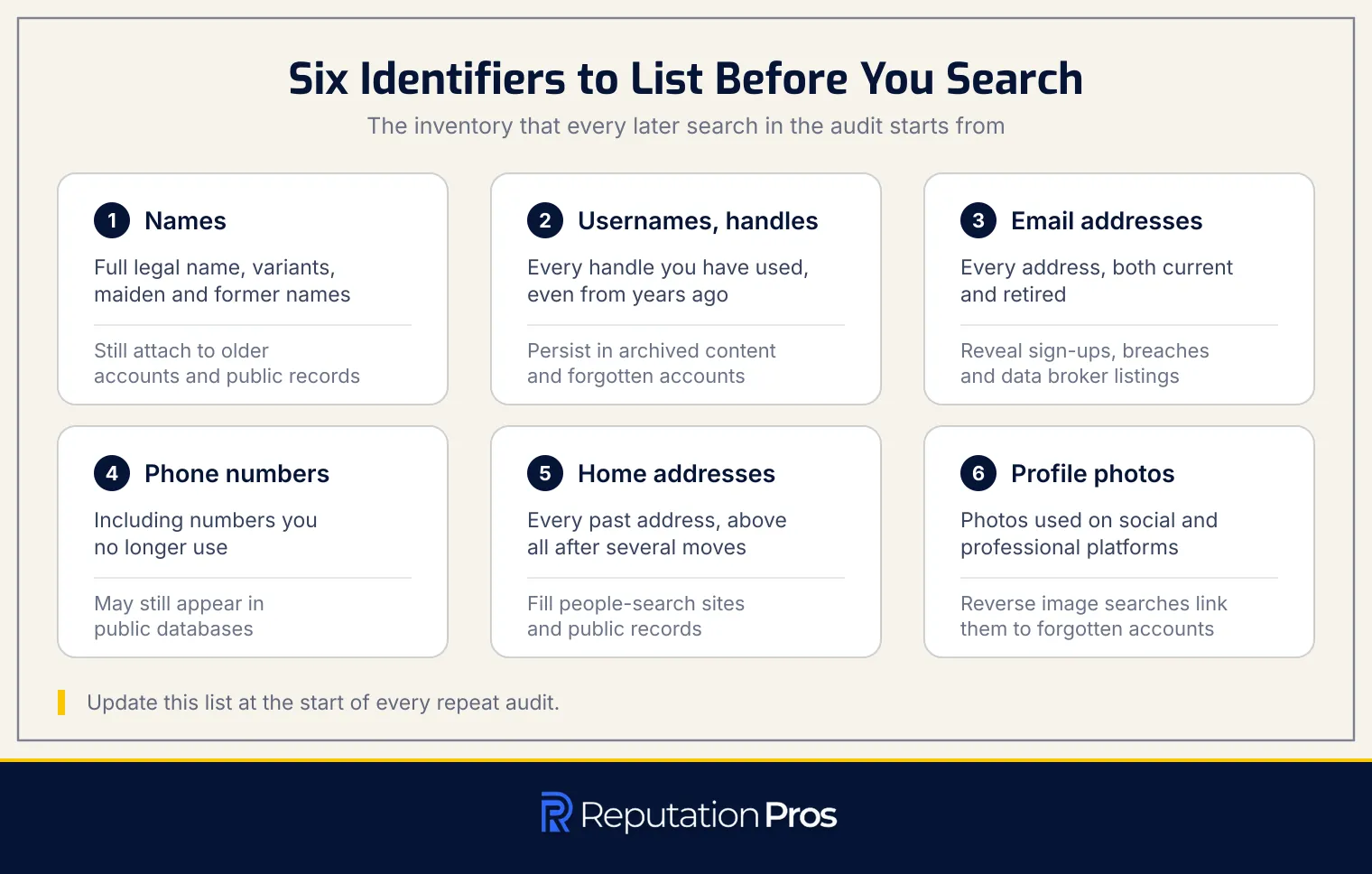
To check and monitor your digital footprint, begin by compiling a full list of identifiers linked to your online presence. The identifier list is the foundation for every later step in the audit process. Start with your full legal name and include any spelling variants, maiden names, or former names. Name variations matter because they still attach to older accounts or public records.
Next, document every username and handle you’ve used across platforms, even those from years ago, as these frequently persist in archived content or forgotten accounts. Catalog all email addresses, both current and retired, since each serves as a unique identifier that can reveal account registrations, breach exposures, and data broker listings. Document all phone numbers associated with your identity, including those you no longer use but which may still appear in public databases.
Add past home addresses, above all if you’ve moved multiple times, as address history frequently appears in people-search sites and public records. Finally, include any profile photos used across social media or professional platforms, as reverse image searches can link these photos to accounts you may have forgotten. With your finished identifier list in hand, you’re ready to begin systematic searches, starting with entering each name variant into Google as exact-match search terms.
2. Search your name on Google
To check and monitor your digital footprint, search your name on Google using specific techniques. Start by entering your full name in quotation marks to perform an exact-match search. The method filters out unrelated results, showing only pages where your name appears as written. Next, combine your name with other identifiers, such as your city, employer, or school, to refine results tied to your specific identity. For example, search “John Smith” Boston or “John Smith” TechCorp to surface results connected to your personal and professional life.
Use Google Images to see which photos are publicly linked to your name, including profile pictures and event photos. Review results beyond the first page, because deeper pages frequently reveal older content or obscure mentions that might impact your online reputation. Conduct these searches in a signed-out browser session or incognito mode to prevent Google from personalizing results based on your search history.
Google’s “Results about you” tool can help you track and request the removal of search results containing personal contact information, such as your phone number or home address. Working through the sources in order builds a clear picture of your public search presence and identifies results needing attention.
3. Search your usernames across websites
Searching your usernames across websites is necessary for checking and monitoring your digital footprint. The process identifies linked accounts by examining username reuse, which frequently connects separate online identities. Begin by using the exact handle and testing common variants, including added numbers, underscores, or alternate spellings.
Open-source username enumeration tools can scan over 500 platforms, such as social networks, forums, and gaming sites, to discover where your usernames are active. The tools reveal accounts that might be missed by name searches, especially when a consistent handle is used across different services. Manual verification of search results is decisive due to the possibility of false-positive matches. Visit each profile to confirm ownership by comparing profile photos, bios, and activity patterns.
Username-first searching offers advantages over name searching by uncovering forgotten accounts and platforms where real names were not used. The method effectively identifies old forum accounts, abandoned social profiles, and services accessed with a shared username. Such full searches help in creating a complete map of your online presence, so that all accounts are accounted for and managed appropriately.
4. Check email addresses and phone numbers for breach exposure
To check email addresses and phone numbers for breach exposure, use a breach-checking service for each identifier. The step is decisive in monitoring your digital footprint. That involves verifying whether your personal data has been compromised in data leaks.
Begin by entering every current and retired email address from your identifier list into a breach-checking service. The results will show breach dates and exposed fields, such as passwords, dates of birth, home addresses, and Social Security numbers. For phone numbers, conduct similar checks to uncover breach records and reverse-lookup listings. Phone-linked breaches reveal identity associations and appear in public records.
Use services like Have I Been Pwned, which maintains a full database of compromised accounts, to perform these checks. Enter each email and phone number individually to receive a detailed history of known breaches. If a breach is confirmed, document the date and exposed data fields in your findings log, prioritizing immediate action for breaches involving sensitive information.
5. Review your social media footprint and privacy settings
To effectively review your social media footprint and privacy settings, begin by viewing each profile as the public would see it. A profile audit uses the “view as public” feature to identify which details, posts, and images are visible. By doing this, you can quickly identify any unintended exposures, such as outdated bio information or public posts that were meant to be private.
Next, examine the audience settings for your posts on each social media account. Adjust the default settings to the most restrictive option that suits your needs, whether that be public, friends-only, or a custom audience. Scroll through past posts to find any that no longer align with your privacy preferences or professional image. Consider deleting or limiting the audience for these posts.
Pay special attention to tagged photos, as these can appear on your profile even if you didn’t upload them. Untag yourself from any photos that compromise your privacy or reputation.
Finally, make certain your profile cannot be discovered via your email address or phone number. Many platforms allow searches by contact details, meaning anyone with your email or phone number can find your profile. Disable this searchability in your privacy settings on all platforms that offer this option. Review any other discoverability settings, such as whether your profile appears in search engine results outside the platform. The step helps keep your digital footprint compartmentalized and under your control.
6. Check data brokers and public records
Checking data brokers and public records is a decisive step in auditing and monitoring your digital footprint. Data brokers are companies that collect, aggregate, and sell personal data to third parties. Their listings usually include fields such as address history, relatives’ names, age, and phone numbers. When you search people-search sites like Whitepages, Spokeo, or BeenVerified using identifiers from your list, you may discover profiles that compile years of your residential moves, family connections, and contact information, all publicly accessible to anyone willing to search.
Public records represent a separate but equally important source of digital footprint exposure. The records, maintained by government agencies, include property deeds, court filings, voter registration records, marriage and divorce certificates, and business registrations. Unlike data broker listings, public records are legal documents that are frequently required by law to be accessible, making them harder to remove entirely. However, understanding what public records exist about you, such as real estate transactions that reveal your home address or court records that detail legal disputes, helps you assess the full scope of your online exposure and informs your decision about which details require action.
Once you identify data broker listings that contain your information, the next step is to initiate opt-out procedures for each broker site individually. Most data brokers provide opt-out forms on their websites, though the process varies: some require email verification, others ask for proof of identity, and many will re-list your information months later, requiring repeated opt-out requests.
For public records, removal is generally not possible due to legal transparency requirements, but you can sometimes request that certain sensitive details, such as your full date of birth or precise home address, be redacted or sealed, depending on the jurisdiction and the nature of the record. Documenting each broker listing you find, along with the opt-out request date and confirmation, helps you track which sites require follow-up and makes certain that your data broker cleanup effort is thorough and ongoing.
7. Find old and unused accounts and document your findings
To effectively check and monitor your digital footprint, identifying old and unused accounts is decisive. Start by searching your email inbox for terms like “welcome,” “verify,” “confirm your account,” or “registration.” These emails frequently indicate services you signed up for but may no longer use. Review your password manager for saved logins; these entries can reveal accounts you have forgotten. Examine apps connected through social media logins or third-party access, as these frequently create accounts without separate passwords. Mark any unused accounts for deletion to reduce data exposure risk.
Create a findings log to document each account, including site name, URL, data exposed, and the action taken. The log becomes the reference for managing your footprint. Once the log is complete, proceed to act on each entry, protecting the security and privacy of your online presence.
8. Remove unwanted exposure and secure active accounts
To remove unwanted exposure and secure active accounts, delete or deactivate unused accounts, untag yourself from social media posts, and submit search-result removal requests. Opt-out of data broker listings and use GDPR and CCPA rights to request data deletion. While some data can be removed, such as from active databases, archives, caches, and third-party copies may persist. Therefore, resetting passwords and enabling two-factor authentication (2FA) on all retained accounts is decisive.
Account deletion is more effective than deactivation, as it secures complete removal from active systems. Untagging yourself from posts reduces visibility of unwanted information. For search engines, use their removal request tools to delist personal data. Data broker opt-outs require contacting each broker individually. Under GDPR and CCPA, you can request data deletion legally, citing Article 17 of GDPR and California Civil Code Section 1798.105 for compliance.
Understanding removal limitations is vital. While platforms may delete content, web archives and search caches frequently retain copies. To prevent account takeovers, secure each account with strong, unique passwords and 2FA, prioritizing authenticator apps over SMS codes to avoid SIM-swapping vulnerabilities.
9. Set alerts and repeat your digital footprint audit
To effectively monitor your digital footprint, set alerts and establish a regular audit routine. Google Alerts can track mentions of your name, email addresses, and usernames, notifying you of new online content. Use breach notification services like Have I Been Pwned to detect exposure in data breaches, enabling timely responses. Schedule regular re-scans to catch re-listed profiles on data broker sites, as these can reappear even after opt-out requests.
A consistent audit schedule is decisive for maintaining control over your digital footprint. Re-scan every six months if you have minimal exposure, quarterly if you have a public-facing career, or more frequently if you face high exposure risks. Each repeat audit should start with an updated inventory of identifiers. A repeat-audit routine rests on understanding what constitutes a personal digital footprint.
What is a personal digital footprint?
A personal digital footprint is the full trail of data tied to an individual’s online activities. A digital footprint divides into two categories: active and passive footprints. An active digital footprint consists of data that a person intentionally shares, such as social media posts, comments, and uploaded photos. In contrast, a passive digital footprint includes information collected without the individual’s direct input, such as browsing history, cookies, and location data. Understanding these two components is decisive for managing one’s online presence effectively.
What is an active digital footprint?
An active digital footprint consists of the data you intentionally share online. An active footprint covers posts, comments, reviews, sign-up forms, and uploaded photos. Every deliberate action, such as submitting a form or sharing a photo, contributes to this footprint, making it a part of your identifiable online presence. Unlike passive traces, which are collected without direct input, active traces are fully controlled by the user.
What is a passive digital footprint?
A passive digital footprint refers to data collected about an individual without their direct input. A passive footprint covers information gathered through cookies, which track browsing behavior, and IP addresses that reveal location data. Browser fingerprinting, another component, identifies unique browser settings and configurations. Location data is frequently collected through GPS-enabled devices, while purchase history is tracked by online retailers. Content that others post about an individual, such as tagged photos, reposts, and sharenting (when parents share information about their children online), contributes to a passive digital footprint. The data is usually collected in the background, frequently without the individual’s explicit knowledge, and can be used to profile behavior and interests.
What can a digital footprint check reveal about you?
A digital footprint check can reveal a range of personal information and associated risks. A footprint check exposes credentials and breach records, which are primary targets for identity theft. The FBI’s Internet Crime Complaint Center logged 859,532 complaints in its 2024 Internet Crime Report with reported losses above $16 billion, a 33% rise on the previous year, and personal data breach ranked third among all reported crime types at 64,882 complaints.
Such checks also uncover publicly accessible contact details, address history, and social media activity, which can fuel phishing and social engineering attacks. Employer screening is a common use of digital footprints; CareerBuilder’s 2017 study put social media screening at 70% of employers, and its 2018 follow-up found 54% had come across content that led them not to hire. Digital footprints also contribute to ad profiling, where browsing and purchase data are used to create behavior models. The permanence of published content, through caches and third-party copies, means that past posts can resurface, impacting reputation even after deletion attempts.
Which public profiles and personal details can appear online?
Public profiles and personal details can be found scattered across several online platforms. The details can be accessed by data brokers, search engines, and social media sites. The most commonly visible information includes:
- Contact Details: This includes your name, phone number, and email address, which can appear on social media profiles and data broker listings.
- Address History: Current and past addresses may be accessible through public records and people-search sites.
- Relatives: Family connections and household members can be inferred from data broker profiles and linked social data.
- Financial Details: Information such as income range, credit status, and property ownership might be visible in public records or aggregated by certain websites.
- Health and Fitness Data: This data can be exposed through health-related searches, wellness apps, and fitness platforms that share activity logs.
- Shopping Data: Purchase history, store preferences, and loyalty-card activity are frequently collected and linked to your identity on e-commerce platforms.
Each of these details contributes to the digital footprint that can be accessed by several entities online.
Which tools can check a digital footprint safely?
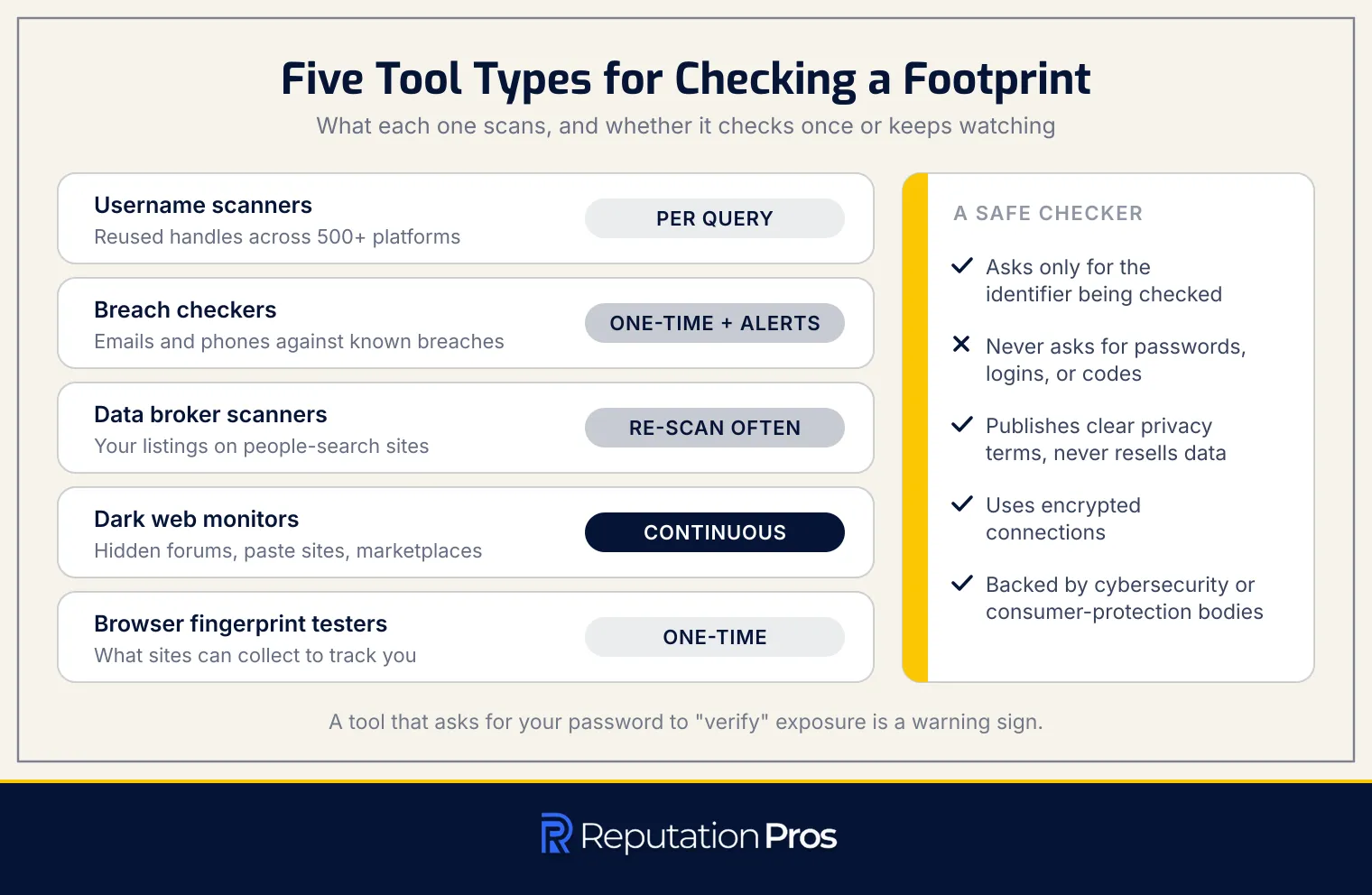
Checking your digital footprint safely involves using specialized tools designed to scan several aspects of your online presence. The tools vary in functionality, from one-time scans to continuous monitoring. Below is a detailed list of tool types and their specific purposes.
- Username Scanners: These tools search for reused handles across over 500 platforms, revealing where your usernames appear online. They usually provide results per query but can be run repeatedly for updates.
- Breach Checkers: Tools like Have I Been Pwned analyze your email addresses and phone numbers against databases of known data breaches. They show which services have exposed your credentials and what data fields were compromised, offering one-time checks with optional alert subscriptions for continuous monitoring.
- Data Broker Scanners: These tools search people-search sites and data aggregators for your listings, revealing personal information such as address history, relatives, age, and phone numbers. Regular re-scanning is required since brokers frequently re-list removed profiles.
- Dark Web Monitors: These scanners monitor hidden forums, paste sites, and illicit marketplaces for your exposed credentials and personal data. They are usually offered as subscription services with ongoing alerts.
- Browser Fingerprint Testers: These tools show what unique identifiers, such as screen resolution, installed fonts, and browser configuration, websites can collect to track you across sessions. They provide instant one-time results each time you test.
Safe tools should only ask for the identifier being checked, such as an email, phone number, or username, and should never ask for account passwords, login access, or verification codes. A legitimate checker should avoid collecting more information than needed, provide clear privacy terms, and never resell scanned data to advertisers or brokers.
If a service requires credentials to “verify” exposure, that is a warning sign rather than a security feature. Always verify that a footprint checker publishes a transparent privacy policy, uses encrypted connections, and comes recommended by established cybersecurity institutions or consumer-protection agencies before submitting any personal identifiers for scanning.
How often should you check your digital footprint?
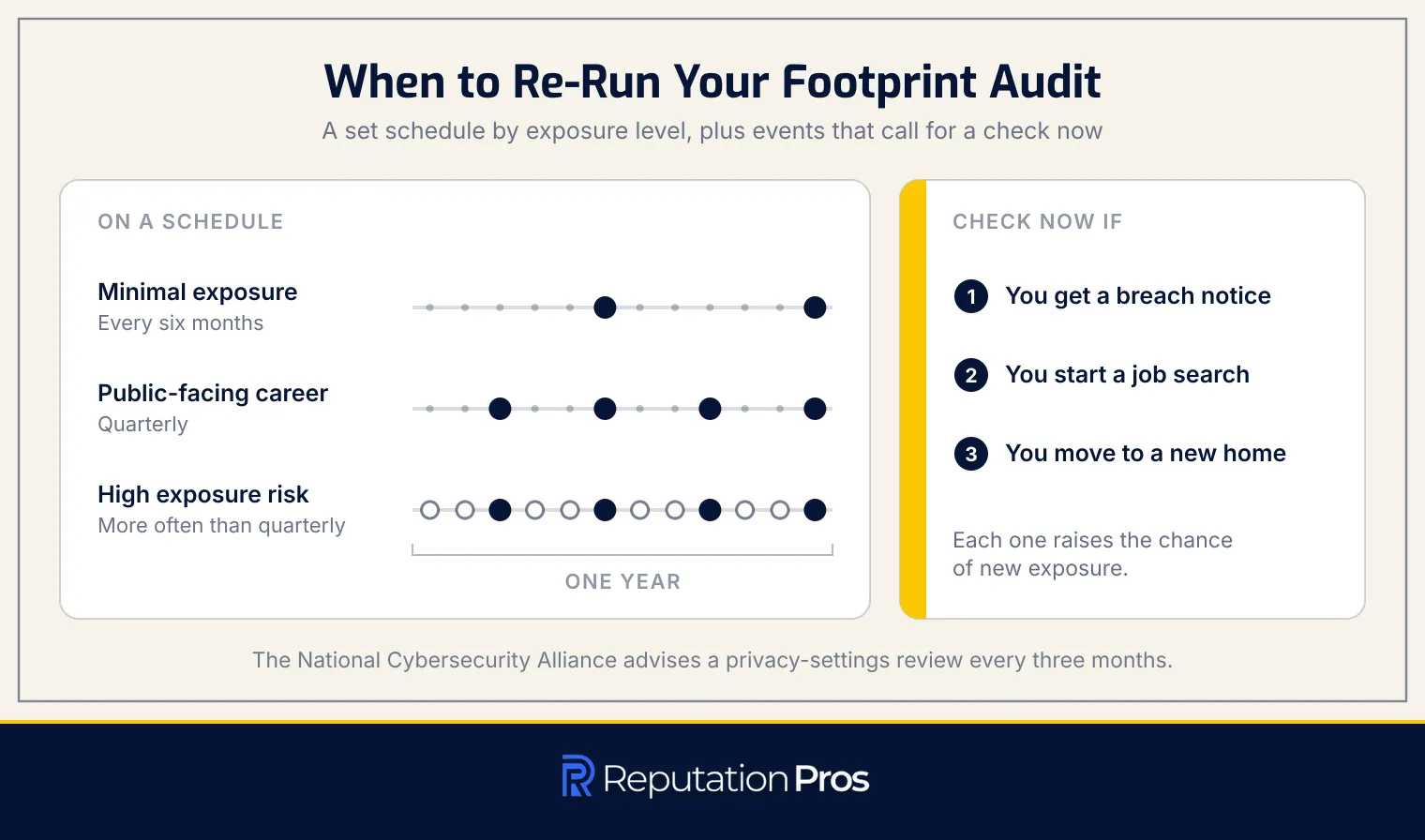
To maintain a secure and current digital footprint, it is recommended to conduct a baseline audit every three to six months. The audit frequency helps make certain that no new data has appeared since the last review and that previously removed information has not resurfaced in search results or data broker sites. The National Cybersecurity Alliance recommends reviewing and adjusting privacy settings once every three months in its guidance “Tread Lightly Online: How to Check and Manage Your Digital Footprint,” which sets a floor for how often the wider audit should run.
In addition to scheduled audits, certain events should trigger an immediate digital footprint review. Trigger events include a breach notification, the start of a job search, or moving to a new home. Those situations raise the chance of new exposure, necessitating a thorough check to mitigate potential risks. Scheduled audits, combined with event-triggered checks, allow for proactive management of one’s online presence, which reduces the risk of identity theft and keeps personal data covered between audits.
What should you do after finding new exposure?
When a digital footprint audit reveals new exposure, it is decisive to address the issue promptly and systematically. Follow these prioritized steps to mitigate potential damage:
1. Change Passwords Immediately Begin by changing passwords for all accounts associated with exposed credentials. Use a unique, strong password for each account to prevent unauthorized access.
2. Initiate a Credit Freeze If financial data such as a Social Security number or bank details is compromised, contact all three nationwide credit bureaus, Equifax, Experian and TransUnion, to freeze your credit. The FTC’s guidance “Credit Freezes and Fraud Alerts” confirms that a freeze is free under federal law and lasts until you lift it, and that you must contact each bureau separately because freezing with one does not notify the others. A one-year fraud alert works differently: it is free, and contacting one bureau obliges that company to tell the other two. Identity theft itself gets reported at IdentityTheft.gov.
3. Submit Removal Requests For unwanted public listings, such as data broker profiles or outdated search results, initiate removal through the platform’s opt-out process or search engine removal request form. Document each request in a findings log for future reference.
4. Log All Findings Maintain a detailed audit log that includes the site name, URL, type of data exposed, actions taken, and completion dates. The log carries follow-up and repeat audits.
After addressing immediate threats, focus on prevention by enhancing privacy settings, improving account security, and adopting digital hygiene practices to minimize future exposure.
How do privacy settings limit digital footprint exposure?
Privacy settings limit digital footprint exposure by controlling the visibility of personal information on social media and other online platforms. The settings determine who can view your posts, profile details, and other activities, effectively reducing the amount of data accessible to the public. By adjusting the default audience for new content and restricting data-sharing permissions, users can manage what information is shared with advertisers and third-party apps.
The effectiveness of privacy settings varies sharply across platforms, as each may have different default configurations. Many platforms set defaults to “public” or enable broad data sharing to maximize engagement and ad revenue, which can expose more information than intended. On a set cadence reviewing and adjusting privacy settings, especially after platform updates, makes certain that personal data remains private and secure from unwanted exposure.
Which social media privacy controls reduce public discovery?
Social media platforms offer several privacy controls to limit public discovery of profiles and personal information. The controls enhance user privacy by restricting access to content and personal data.
-
Profile Visibility: Users can set their profiles to private, allowing only approved followers to view their content.
-
Per-Post Audience: This setting allows users to choose who can see each individual post, whether it be everyone, friends, or specific groups.
-
Tag Review Before Posting: Users can require approval before tags appear on their profiles, preventing unwanted associations.
-
Lookup by Email or Phone: This feature can be disabled to prevent others from finding profiles using contact details.
-
Off-Platform Search Indexing: Users can block search engines from indexing their profiles, reducing the likelihood of appearing in search results.
How does account security protect your online identity?
Account security protects your online identity by preventing unauthorized access, above all to accounts identified as vulnerable during a breach check. Credential reuse across multiple sites poses a substantial risk, as a breach at one service can lead to account takeovers elsewhere. A password manager generates and stores unique passwords for each account, mitigating the risk of credential stuffing. Two-factor authentication (2FA) adds an additional layer of security by requiring a second verification step, such as a code from an app or SMS, which blocks access even if a password is compromised.
Microsoft’s security research reports that multi-factor authentication blocks 99.9% of automated account compromise attacks, and CISA states in its “More Than a Password” guidance that turning on MFA makes an account 99% less likely to be hacked. Together those measures form a strong defence against unauthorized access, helping to secure your online identity.
Which account controls reduce breach damage?
Implementing strong account controls can sharply reduce the damage from potential breaches. Key measures include:
- Unique Passwords: Use distinct passwords for each account to prevent credential stuffing attacks. A password manager can assist in generating and storing these securely.
- Two-Factor Authentication (2FA) or Passkeys: Enable 2FA for an added security layer, requiring a second verification step beyond the password. Passkeys offer even greater protection by using cryptographic keys instead of passwords.
- Login Alerts: Activate notifications to receive alerts for any new device access or suspicious sign-ins. The alerts allow for immediate action to prevent unauthorized access.
- Avoiding Social Login: Refrain from using social media logins for third-party services to avoid a single point of failure. Create separate accounts with unique credentials to maintain security and limit breach impact.
The controls collectively enhance account security and minimize potential risks associated with breaches.
How does digital hygiene limit future exposure?
Digital hygiene limits future exposure by establishing routines that prevent the accumulation of new data traces and accounts over time. Practicing digital hygiene involves sharing minimal data at sign-up, which reduces the volume of personal details stored across services. Using separate or alias email addresses for different types of sign-ups creates compartmentalization that prevents a single identifier from linking all accounts together and limits the reach of a breach or data leak.
Closing accounts immediately when their use stops eliminates repositories where outdated personal information sits exposed and vulnerable to unauthorized access. Scheduled permission reviews, such as quarterly audits of which apps can access your social media accounts, location data, or contacts, allow you to revoke access that is no longer needed or justified.
Deliberate posting means pausing before sharing to consider whether the content, audience, and platform align with how you want your digital footprint to appear in future searches, employer screenings, or security audits. Together, these hygiene habits form a defensive layer that stops old, forgotten accounts and scattered personal data from building up again, keeping the footprint that any future audit will uncover smaller, more controlled, and easier to manage.
How do browsers and apps expand your online exposure?
Browsers and apps expand your online exposure through tracking-friendly default settings and extensive data sharing with third parties. Most browsers and apps are configured to allow cookies, tracking scripts, and data collection that monitor your activity across websites and services. The practices build detailed profiles of your interests, behaviors, and habits. Apps frequently share collected data, including browsing history, location, contacts, and usage patterns, with advertising networks, analytics companies, and data brokers, frequently without clear disclosure.
To limit this expansion of your digital footprint, privacy-focused tools and settings can be adopted. Using a VPN can mask your IP address and encrypt your connection, while anti-tracking browsers or privacy extensions can block third-party trackers. Turning off location history in both browser and device settings and disabling ad personalization across your accounts and apps further reduces exposure. On a set cadence reviewing and revoking unnecessary app permissions helps minimize passive data collection, thereby limiting how much of your activity feeds into your digital footprint.
How do cookies and trackers collect browsing data?
Cookies and trackers collect browsing data through several mechanisms that create full user profiles. First-party cookies are set by the website you visit and store session information, such as login states and preferences. Third-party cookies, frequently used by advertisers, track user behavior across multiple sites to build detailed profiles. Tracking pixels, small invisible images embedded in web pages, record when content is loaded and capture data like IP addresses and device types. Browser fingerprinting identifies users by collecting unique browser configurations, even in the absence of cookies. While incognito mode prevents local history storage, it does not block server-side tracking or hide IP addresses, allowing continued data collection.
Which app permissions expose location data?
App permissions that expose location data include several key settings that users should be aware of. The permissions determine how precisely and frequently an app can access a user’s location information.
-
Precise versus approximate location: Apps can request access to your exact GPS coordinates or a broader area. Precise location provides specific details about your position, while approximate location limits access to a general area.
-
Background location access: This permission allows apps to track your location even when they are not actively being used. Always-on permission means continuous location tracking, which is rarely necessary for all app functions.
-
Third-party app access: Some apps share your location data with third-party services, including advertisers and analytics platforms. Third-party SDKs extend location access beyond the app developer.
-
Revoking permissions: Users can manage location permissions through their device settings. Options include setting location access to “Never,” “Ask Next Time,” “While Using the App,” or denying background access entirely.
How does location sharing affect your digital footprint?
Location sharing sharply impacts your digital footprint by creating a detailed map of your movements and habits. Live location sharing, check-ins, and geotagged posts reveal your current whereabouts, while stored location history provides a full record of your daily activities. The data can expose sensitive information such as your home address, workplace, and daily routine, posing safety risks like stalking or burglary. Consistent sharing from the same location can inadvertently disclose when your home is unoccupied, increasing vulnerability to theft. Photos also contribute to this exposure through embedded location metadata, which can reveal where and when an image was taken. EXIF metadata stored in photo files gets removed before sharing to maintain privacy.
How do you remove location metadata from photos?
Removing location metadata from photos involves stripping EXIF GPS tags that store precise location data. The process is necessary for maintaining privacy when sharing images online. Below are the steps to remove location data on iOS and Android devices.
- On iOS Devices: Open the Photos app and select the photo you want to share. Tap the share icon, then tap “Options” at the top of the share sheet. Toggle off the “Location” switch to remove the GPS coordinates from the shared copy.
- On Android Devices: Open the photo in the Gallery or Photos app. Tap the share icon and look for the “Remove location data” option in the sharing settings. Confirm the action to strip the location information from the image.
By following these steps, you can make certain that the location data is not included when sharing photos, thus protecting your privacy.
Which online accounts can retain personal data?
Online accounts frequently store a wide range of personal data, even after active use ends. Below are the main account types and the specific data they usually retain:
-
Shopping Accounts: These accounts generally keep your name, shipping address, purchase history, saved payment methods, and wish lists. The data is used to fulfill orders and facilitate refunds or account recovery.
-
Fitness and Health Apps: Fitness and health apps store sensitive information such as workout history, device data, sleep patterns, heart-rate metrics, and location-linked activity. Health data stays active while the account is in use and may be deleted after prolonged inactivity.
-
Smart Home and Wearable Devices: Smart home and wearable devices retain device identifiers, sensor logs, routines, and usage history. Device records keep connected devices functioning correctly and can be managed remotely.
-
AI Chatbots: AI chatbots store conversation history, prompts, uploaded files, and usage logs. Retention windows after deletion vary by provider, so the governing figure is whatever that service’s own privacy policy states rather than a general rule.
-
Retention After Account Deletion: Many services keep some data post-deletion for purposes like backups, fraud prevention, legal compliance, or security. Closing an account therefore leaves portions of your digital footprint that may persist in company databases. Article 17 of the General Data Protection Regulation gives individuals a right to erasure, and European Data Protection Board guidance on that right confirms a controller may keep data where a legitimate ground applies while having to delete what is no longer necessary for the purpose it was collected for.
How can you keep your digital footprint smaller?
Minimizing your digital footprint involves adopting specific habits that reduce online exposure over time. The following practices are necessary for maintaining a smaller digital footprint:
- Share Less Publicly: Limit the personal information, photos, and opinions you post on social media and public forums. Consider whether content should remain private before sharing.
- Delete Unused Accounts: Close dormant accounts to prevent data accumulation and potential security risks. Follow each platform’s deletion process to secure complete data removal.
- Limit App Permissions: On a set cadence review and restrict app permissions to necessary functions. Deny unnecessary access to features like location, contacts, and camera.
- Repeat Data Broker Opt-Outs: On a set cadence check and submit opt-out requests to data brokers, as profiles can reappear over time.
- Ask Others to Untag or Remove Posts: Request friends and family to untag you or adjust privacy settings on posts that include you. For sensitive content, ask for complete removal.
The habits not only reduce the size of your digital footprint but also streamline the check-and-monitor routine necessary for effective digital footprint management.