Digital Footprint: Meaning, Examples, and Types

 25 min read
 On this page
A digital footprint is the data trail left by online activities, created both intentionally and unintentionally. A digital footprint includes information shared on social media, search history, and data collected automatically by websites and apps. The data forming a digital footprint includes identity details like names and email addresses, behavioral data such as browsing history, location data from GPS and IP addresses, financial records, and device information. Footprint data comes from both user input and automated tracking like cookies and browser fingerprinting. A footprint identifies individuals once data points are aggregated.
Digital footprints are categorized into active and passive types. Active digital footprints are created deliberately by users sharing information online, while passive digital footprints are collected without direct user awareness, such as through IP logging. Everyday activities like social media posting create active footprints, while browsing and app usage frequently result in passive footprints. The significance of a digital footprint lies in its impact on online reputation, personal security, and children’s privacy. Enterprises also face risks as employee data contributes to their digital footprint, potentially exposing them to cyber threats. Various parties can access digital footprints, including employers, advertisers, and cybercriminals, linking footprints to privacy and cybersecurity concerns.
To manage digital footprints, individuals can search their names online, review privacy settings, and request data removal. Complete erasure is rare due to data persistence in backups and caches. Reducing footprints involves adjusting social media privacy settings and using privacy-focused browsing tools. Best practices for managing digital footprints include being mindful of online sharing and auditing digital presence on a set schedule, maintaining alignment with the initial definition of a digital footprint.
How Can a Digital Footprint Be Defined?
A digital footprint is the trail of data created by an individual’s online activities, encompassing both intentional and unintentional information sharing. The data trail grows with each interaction on websites, apps, and connected devices, forming a semi-permanent record that can persist over time. Unlike an online identity, which is the persona users consciously cultivate through profiles and posts, a digital footprint, frequently termed a digital shadow or internet footprint, includes all traceable data, whether shared actively or collected passively.
The distinction between a digital footprint and an online identity is decisive. While an online identity reflects the user’s deliberate self-presentation, a digital footprint reveals a broader spectrum of activities, including metadata and behavioral patterns collected without explicit user input. The accumulated record stays accessible to many parties, highlighting the importance of understanding the categories of data that contribute to a digital footprint.
What Data Can Form a Digital Footprint?
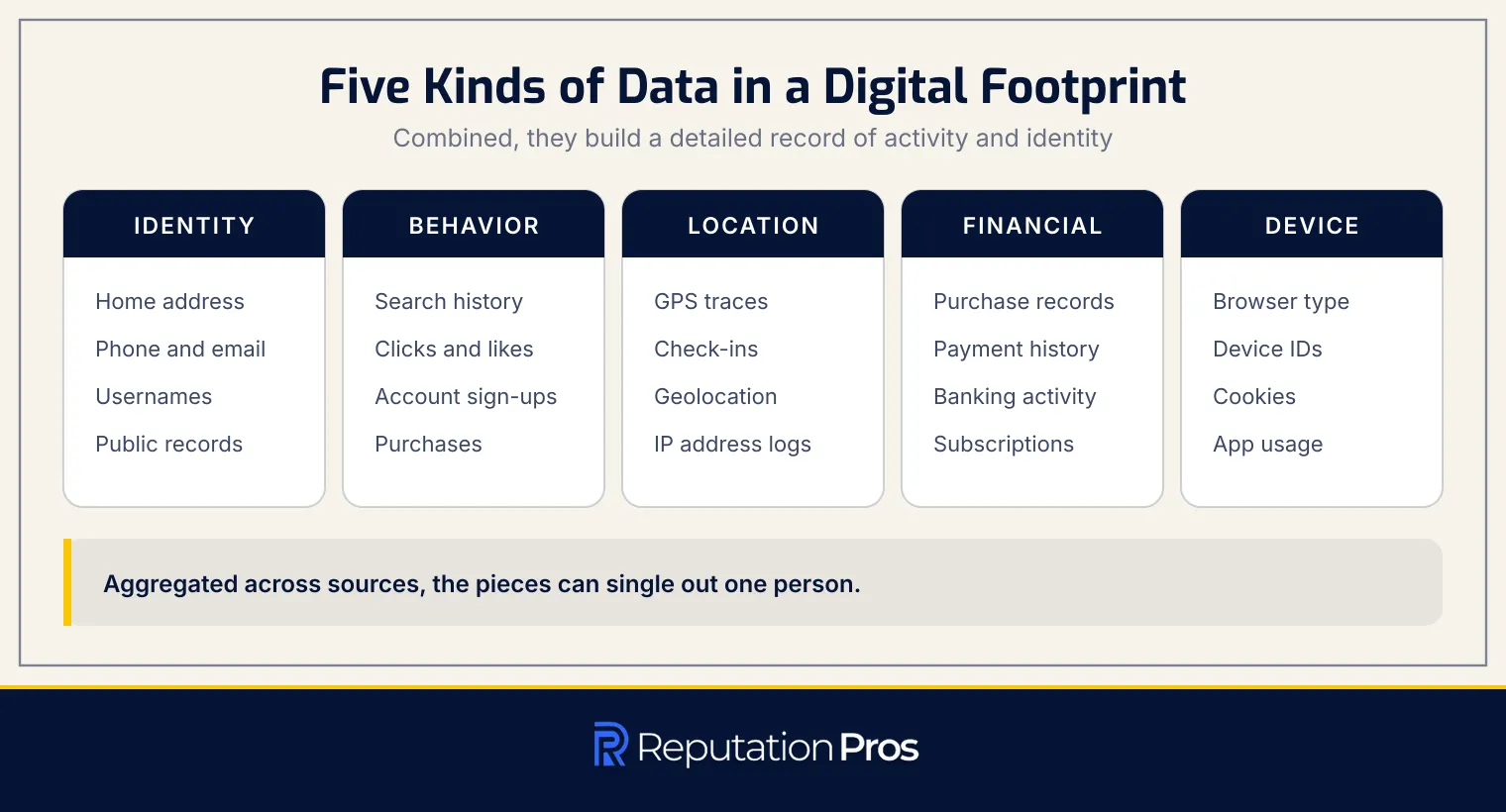
A digital footprint consists of several data categories, each contributing to an individual’s online presence. The primary data types include identity, behavioral, location, financial, and device data. Below is a detailed breakdown of each category:
- Identity Data: This includes personal identifiers such as home address, phone number, email address, usernames, profile details, photos, and public records linked to a person’s name.
- Behavioral Data: This type of data captures online interactions, including search and browsing history, clicks, page views, likes, comments, shares, account sign-ups, and purchase activity.
- Location Data: This data reveals physical movement and presence through geolocation, GPS traces, check-ins, and IP address logs that can indicate where a person is or has been.
- Financial Data: This category encompasses economic transactions such as online purchase records, payment history, banking activity, subscription records, and transaction details.
- Device Data: This data identifies the technology used to access online services, including IP address, browser type, device identifiers, app usage, cookies, and technical metadata collected from phones, computers, and connected devices.
Each category plays a decisive role in forming a full digital footprint, and when combined, these data points can create a detailed record of an individual’s digital activities and identity.
How Is a Digital Footprint Created and Collected?
A digital footprint is created through both user input and background tracking. User input involves deliberate actions such as posting content, filling out forms, and creating accounts. Background tracking occurs automatically through technologies like cookies, tracking pixels, and browser fingerprinting, which record user behavior without explicit consent. Mobile apps further contribute by collecting data via permissions granted during installation, frequently accessing location, contacts, and device information.
Data aggregation across multiple sources enhances the digital footprint’s comprehensiveness. Platforms, advertisers, and data brokers compile information from websites, apps, public records, and purchased datasets to build detailed profiles. Offline activities, such as store loyalty programs and public records, also feed into the digital footprint when linked to online identifiers. The aggregation of these data points can potentially single out individuals, creating a full profile.
Can a Digital Footprint Identify a Person?
Yes, a digital footprint can identify a person. Digital footprints frequently contain personally identifiable information (PII) such as names, email addresses, and phone numbers, which directly reveal an individual’s identity. Quasi-identifiers like browsing patterns and location data, when combined with other datasets, can pinpoint a specific person. Cross-site linking allows data brokers to connect separate data points from different platforms, creating full profiles.
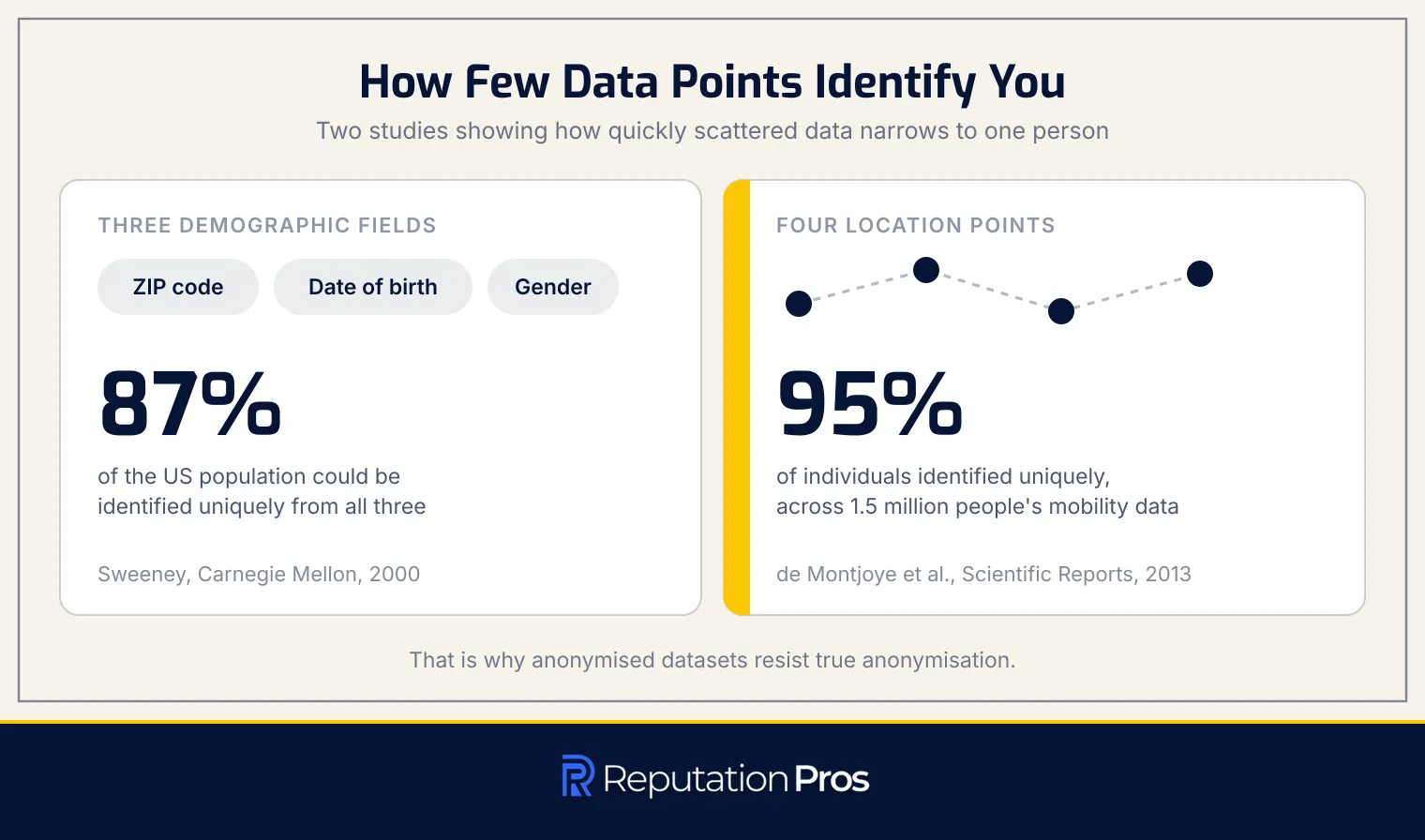
Research supports this. Latanya Sweeney’s paper “Simple Demographics Frequently Identify People Uniquely,” published as a Carnegie Mellon Data Privacy Lab working paper in 2000, found that 87% of the US population could be uniquely identified from three pieces of information: five-digit ZIP code, date of birth, and gender.
Location data narrows identity faster still. A 2013 study in Scientific Reports by Yves-Alexandre de Montjoye, César Hidalgo, Michel Verleysen and Vincent Blondel, “Unique in the Crowd: The privacy bounds of human mobility,” analysed fifteen months of mobility data for one and a half million people and found that four spatio-temporal points are enough to identify 95% of individuals uniquely, which is why anonymised datasets resist true anonymisation.
What Are the Main Types of Digital Footprints?
Digital footprints are primarily divided into two categories: active digital footprints and passive digital footprints. Each type is characterized by how the data is generated and the user’s awareness of its collection.
- Active Digital Footprint: This type of footprint is created when a user voluntarily shares information online. Examples include posting on social media, writing reviews, submitting forms, or signing up for newsletters. Users are usually aware of these actions and have control over the data they share.
- Passive Digital Footprint: A passive digital footprint is formed without the user’s direct input. A passive footprint includes data collected through background processes such as IP address logging, cookies, and location tracking by mobile apps. Users frequently remain unaware of this data collection as it occurs automatically.
How Does an Active Digital Footprint Work?
An active digital footprint is created through deliberate user actions when sharing information online. An active footprint forms when individuals intentionally post content, submit data through forms, create accounts, or engage in any online activity where they are aware they are sharing information. The user exercises direct control over what is posted, including social media updates, comments, product reviews, blog posts, forum contributions, emails sent, and profile information entered during account registration.
The reach of an active digital footprint depends on the platform and privacy settings chosen by the user, ranging from fully public content visible to anyone on the internet, to semi-public content restricted to specific groups, friends, or followers, to more private communications like direct messages or emails. However, even content shared with privacy restrictions can become more widely distributed through screenshots, sharing by recipients, or platform data breaches.
CareerBuilder’s 2017 study of hiring managers put social media screening at 70% of employers, and its 2018 follow-up found 54% had come across content that led them not to hire, which makes an active footprint part of a professional record rather than a private one. While users have more control over the initial creation of active footprints compared to passive ones, the permanence and potential redistribution of voluntarily shared content means that even deliberate posts require careful consideration before publication.
How Does a Passive Digital Footprint Work?
A passive digital footprint forms when data is collected without explicit user action. Unlike active footprints, which involve deliberate sharing, passive footprints accumulate silently as users interact with online services. Passive collection runs through background processes, such as IP address logging, location tracking, and ad profiling. Users frequently remain unaware of the extent of this data collection because it happens without their direct input or control.
Consent banners have become more common, aiming to inform users about data collection practices. However, these banners do not fully prevent passive tracking, as some data is still gathered through technical necessities like server logs and device connections. Low visibility is what separates passive footprints from active ones, which are characterized by user awareness and control over shared information.
How Do Active and Passive Digital Footprints Differ?
Active and passive digital footprints differ across several key dimensions, each defining how data is created, controlled, and managed. The comparison table below outlines these distinctions.
| Dimension | Active Digital Footprint | Passive Digital Footprint |
|---|---|---|
| Intent | Deliberate sharing; user consciously decides to post or submit data | Automatic collection; data gathered as a byproduct without intentional sharing |
| User Awareness | High; user knows they are leaving a trace when posting or commenting | Low; user frequently unaware that data is being logged or tracked in the background |
| User Control | Higher control; user chooses what to share and with whom through posts and privacy settings | Minimal control; collection happens continuously via cookies, trackers, and app permissions |
| Visibility | Visible to user and chosen audience; can be reviewed on profiles and timelines | Largely invisible; stored in server logs, advertiser databases, and data broker records |
| Who Collects the Data | Platforms and services where user posts: social media networks, e-commerce sites | Advertisers, analytics firms, data brokers, ISPs, and third-party trackers |
| Removal Difficulty | Easier to remove; user can delete posts or close accounts | Harder to remove; data distributed across many trackers and brokers, requiring opt-out requests |
Understanding these differences helps individuals better manage their digital presence and take appropriate actions to protect their privacy.
What Are Common Digital Footprint Examples?
A digital footprint is the trail of data left by an individual’s online activities. Certain activities create both active and passive footprints at once. Below are common examples of everyday online activities that contribute to one’s digital footprint:
- Social Media Activity: Posting photos, comments, and updates on platforms like Facebook and Twitter. Each interaction, such as likes and shares, adds to the visible record of online engagement.
- Online Shopping: Purchasing items, signing up for newsletters, and saving payment details on e-commerce sites. Purchases generate transactional data and browsing patterns.
- Online Banking: Accessing bank accounts, paying bills, and applying for loans online. Financial activities leave detailed logs of transactions and account access.
- Search Engines: Using search engines like Google to query information. Search history and clicked results reveal interests and information needs.
- News and Content Sites: Reading articles, subscribing to newsletters, and sharing content. Streaming and browsing create traces of engagement patterns.
- Mobile Apps: Installing and using apps on smartphones. Apps collect data on usage, permissions granted, and location history.
- Health and Fitness Tracking: Using fitness apps and devices like smartwatches to record workouts, sleep patterns, and health metrics. Wearables track sensitive health data and location information.
Each of these activities contributes to building a full digital profile, reflecting both deliberate actions and passive data collection.
What Are Examples of an Active Digital Footprint?
An active digital footprint consists of data intentionally shared or created by users online. The examples show how individuals knowingly contribute to their digital presence:
- Social Media Posts and Comments: Content shared on platforms like Facebook, Twitter, and Instagram.
- Product Reviews: Ratings and written feedback submitted on e-commerce sites.
- Online Form Submissions: Information provided through contact forms, surveys, or applications.
- Account Sign-Ups: Personal details entered to create new online accounts.
- Newsletter Subscriptions: Email addresses and preferences submitted for receiving updates.
- Sent Emails: Messages composed and sent through email services, recording communication details.
Each example represents a deliberate action by the user, distinguishing active footprints from passive data collection.
What Are Examples of a Passive Digital Footprint?
A passive digital footprint consists of data traces collected without the user’s explicit knowledge or action. Traces accumulate across online activity and interactions.
- Cookie-Tracked Browsing: Websites use cookies and tracking pixels to monitor and record browsing behavior across different sites.
- IP Address Logs: Each internet connection logs the IP address, revealing approximate geographical location and device identity.
- App Location Tracking: Mobile applications frequently gather GPS and geolocation data in the background, mapping user movements.
- Search Engine Logs: Search engines store queries and click history, creating a detailed profile of search behavior.
- Smart Device (IoT) Data: Internet-connected devices like smart TVs and fitness trackers automatically collect and transmit usage data.
Which Actions Create Both Active and Passive Traces?
Digital activities frequently leave both active and passive traces, reflecting a combination of deliberate actions and automatic data collection. The table below highlights common online activities and the types of digital traces they generate.
| Action | Active Trace Left | Passive Trace Left |
|---|---|---|
| Online shopping | Account creation, checkout details, product reviews | Tracking cookies, browsing history, IP logs, purchase profiling, ad retargeting |
| Social media posting | Posts, comments, likes, profile updates, photo uploads | Metadata, location tags, device info, audience/engagement signals, platform tracking |
| Fitness app use | Manually entered workouts, goals, profile details | Location data, movement patterns, sensor data, usage analytics, background syncing |
| Online banking | Logins, transfers, bill payments, account settings changes | Device fingerprinting, IP logs, fraud-monitoring signals, session analytics |
| Streaming or video browsing | Watchlists, ratings, follows, searched titles | Viewing patterns, device and location signals, recommendation profiling, autoplay behavior |
Activities that leave both trace types are what make managing a digital footprint hard.
Why Does a Digital Footprint Matter?
A digital footprint holds substantial importance due to its lasting impact on reputation, employability, privacy, and security. In today’s digital age, approximately 70% of employers screen potential candidates using online data, making one’s digital presence a decisive factor in hiring decisions. Beyond employment, digital footprints influence insurance pricing, admissions processes, and personal relationships, as organizations and individuals increasingly rely on online research to assess character and credibility.
The permanence of online data means that the information shared or collected can persist indefinitely, exposing individuals to risks such as targeted scams, identity theft, and account takeovers.
For children, a digital footprint created before they can consent may follow them into adulthood, affecting future educational and employment opportunities. Employees’ personal digital footprints can expand an organization’s attack surface, leading to compliance exposure and potential cyber threats. Therefore, managing a digital footprint is necessary to maintaining a positive online reputation and minimizing security vulnerabilities.
How Does a Digital Footprint Affect Online Reputation?
A digital footprint sharply influences online reputation through several mechanisms. Here are key ways it shapes perceptions:
- Employer and Admissions Screening: Approximately 70% of employers use search engines and social media to screen job candidates’ online presence before making hiring decisions. Admissions offices evaluate applicants’ digital footprints during the selection process. Screening determines whether a candidate advances or is eliminated based on their online presence.
- Old Posts Read Out of Context: Content shared years ago can resurface and be interpreted differently than originally intended. Posts created in one context may be viewed through a different lens by future employers or colleagues, potentially damaging reputation even when the original intent was harmless.
- Permanence of Published Content: Once information is posted online, it becomes extremely difficult to fully remove. Content can be archived, screenshotted, cached, or redistributed across multiple platforms, creating a lasting record that continues to influence reputation long after the original publication.
- Positive vs. Negative Footprint Effects: A digital footprint can either harm or enhance reputation. Inappropriate content, controversial statements, or unprofessional behavior can damage trust and credibility. Conversely, a well-curated digital presence showcasing professional achievements or positive personal interests can enhance reputation and support career advancement.
How Can a Digital Footprint Affect Personal Security?
A digital footprint can expose individuals to several personal security threats. Cybercriminals exploit those threats to compromise personal information and safety. Below are key security risks associated with a digital footprint:
- Spear Phishing: Crafted phishing emails that use personal details to appear legitimate, tricking individuals into revealing sensitive information.
- Identity Theft: Unauthorized use of personal data, such as names and addresses, to impersonate someone and commit fraud.
- Account Takeover: Gaining unauthorized access to online accounts by piecing together data from several sources.
- Guessed Security-Question Answers: Using publicly available information to answer security questions and reset account passwords.
- Doxxing: Publicly releasing personal information, such as addresses and phone numbers, to harass or threaten individuals.
The risks are why a footprint needs managing to protect personal security.
What Digital Footprint Risks Do Children Face?
Children face several digital footprint risks that can impact them both now and in the future. The risks cover a footprint created before the child can consent, data collection by school platforms, and long-term effects on future opportunities. The key risks are outlined below.
- Footprint Created Before Consent: Children frequently have digital footprints established by parents through “sharenting,” where personal information and images are shared online without the child’s consent, creating a permanent digital record. A footprint of that kind exists before the child is old enough to consent to any of it.
- School Platform Data Collection: Educational platforms collect extensive data on children, including academic performance and behavioral records. Platform data gets collected with limited parental oversight and is governed by regulations like the Children’s Online Privacy Protection Act (COPPA), which requires parental consent for data collection from children under 13.
- Long-Term Impact on Future Opportunities: Digital footprints can have lasting consequences on educational and employment prospects. In 2017 at least ten students had their Ivy League admissions rescinded due to inappropriate online behavior discovered through their digital footprints. Employer screening of candidates’ online presence is now routine, which is what carries a childhood footprint into an adult hiring decision.
The risks are why a child’s digital footprint needs managing carefully to safeguard their future opportunities and privacy.
How Do Personal Digital Footprints Shape an Enterprise Footprint?
Personal digital footprints sharply impact an enterprise’s security and compliance environment. Employee data, when shared on public platforms, can widen the organizational attack surface. Exposure runs through open-source intelligence gathering, where threat actors exploit professional information to craft targeted attacks. The attacks include business email compromise (BEC), whaling, and pretexting. For example, attackers may use employee biographies and posts to impersonate executives or internal staff, targeting sensitive workflows in finance and HR.
The consequences of personal digital footprints on enterprises are substantial. The FBI’s Internet Crime Complaint Center recorded 21,832 business email compromise complaints in 2022, with adjusted losses above $2.7 billion. Many of these attacks used OSINT from employees’ digital footprints to create convincing impersonation attempts. Enterprises face compliance risks, above all under regulations like GDPR and CCPA, when employee data handling practices expose corporate information. Organizations must manage these risks despite limited control over employees’ personal online activities.
Who Can See a Digital Footprint?
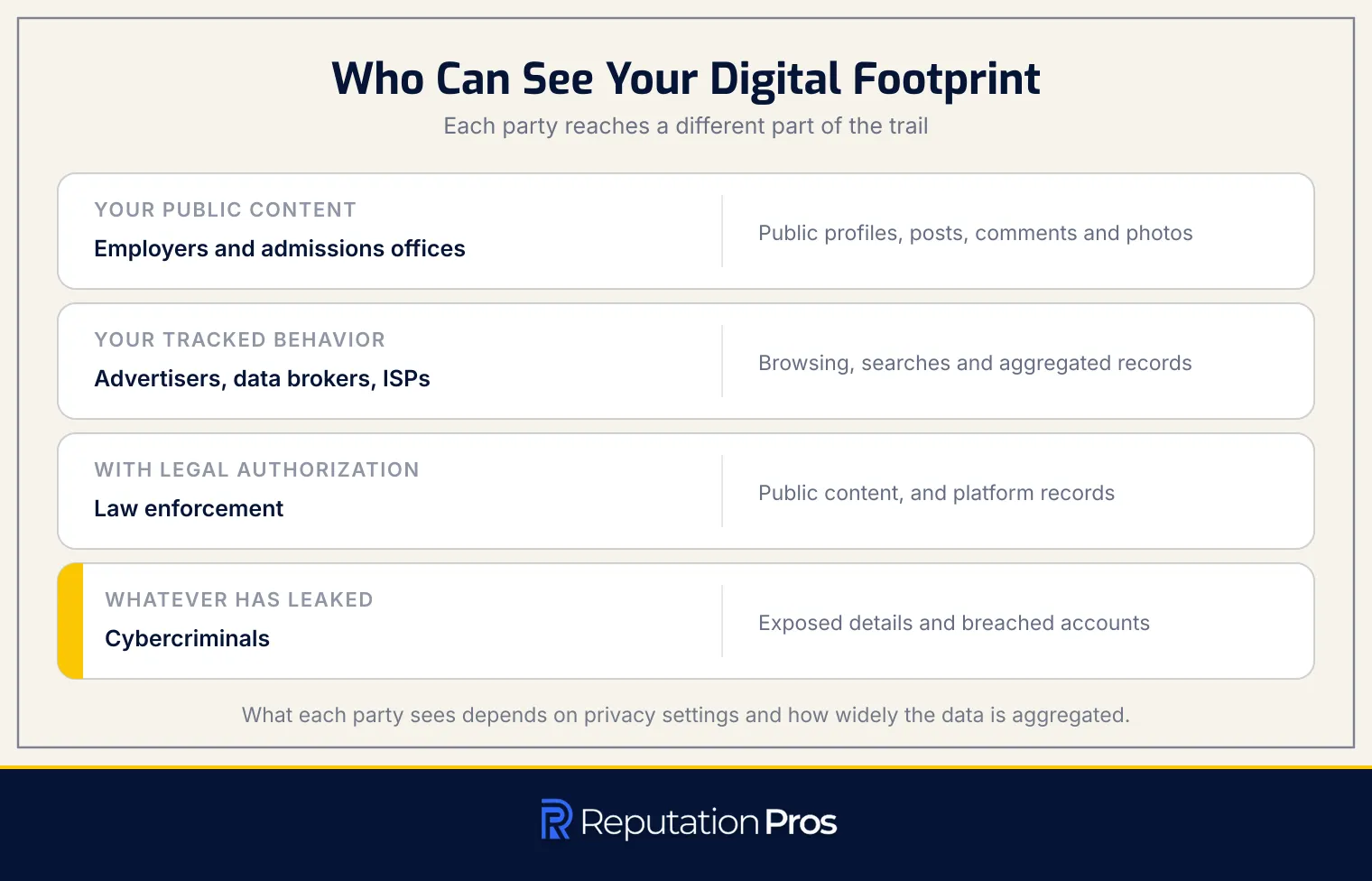
A digital footprint is visible to several entities, each accessing different parts of it for specific purposes. The primary parties who can see a digital footprint are detailed below.
- Employers: Employers can view public social media profiles, comments, and other open-web content to assess candidates during hiring processes.
- Schools and Admissions Offices: These institutions review public social media activity, shared photos, and other online content to evaluate applicants.
- Advertisers: Advertisers access browsing behavior and search activity through cookies and tracking technologies to create targeted ad profiles.
- Data Brokers: Data brokers aggregate information from public records and commercial data feeds to build detailed profiles for sale to third parties.
- Internet Service Providers (ISPs): ISPs can monitor unencrypted web traffic, including websites visited and time spent online.
- Law Enforcement: Law enforcement can access publicly available content and, with legal authorization, obtain records from platforms.
- Cybercriminals: Cybercriminals exploit exposed personal details from public pages and breached accounts for scams and identity theft.
Each of these parties sees different segments of a digital footprint, depending on factors like privacy settings and data aggregation methods.
How Does a Digital Footprint Relate to Online Privacy?
A digital footprint directly impacts online privacy through the collection and use of personal data. The trail, built from deliberate action and passive tracking, frequently lacks explicit user consent and control. As users engage in online activities, data such as browsing history, search queries, and social media interactions are collected, forming detailed behavioral profiles. Broker profiles feed targeted advertising, frequently without the user’s informed consent.
Privacy regulations like the General Data Protection Regulation (GDPR) and the California Consumer Privacy Act (CCPA), enhanced by the California Privacy Rights Act (CPRA), aim to address this imbalance. Data protection laws grant rights to access personal data, understand its use, and opt out of certain data processing activities. By focusing on consent and data control, these frameworks seek to enhance online privacy, distinct from cybersecurity, which primarily addresses data protection against unauthorized access.
How Can a Digital Footprint Increase Cybersecurity Exposure?
A digital footprint increases cybersecurity exposure by expanding the attack surface available to malicious actors. Personal data, such as email addresses, phone numbers, and IP addresses, can be exploited to facilitate unauthorized access or identity theft. When combined with breached records, reused credentials, and information available on dark web listings, this data becomes a powerful tool for cybercriminals.
Verizon’s 2023 Data Breach Investigations Report put stolen or compromised credentials at the root of just under half of all breaches. IBM’s Cost of a Data Breach Report 2023 identified stolen credentials as a leading initial attack vector at 15% of breaches, against a global average breach cost of $4.45 million, and its 2025 edition put that average at $4.44 million. The attack surface a digital footprint creates is why data protection safeguards matter to mitigate these risks.
How Can Personal Data Protection Limit Digital Footprint Risks?
Personal data protection limits digital footprint risks by implementing both legal rights and practical safeguards. Data minimization is a key principle, so that only necessary personal information is collected and retained, which reduces the potential attack surface. Legal frameworks like the General Data Protection Regulation (GDPR) provide enforceable rights, such as the right of access, allowing individuals to see what data organizations hold about them. The GDPR Article 17, known as the “right to erasure,” empowers individuals to request the deletion of personal data when it is no longer needed, consent is withdrawn, or processing is unlawful. Those rights let users manage a footprint rather than only observe it and control who can access their information.
On the technical side, security measures such as two-factor authentication (2FA) and password managers enhance protection. Two-factor authentication adds an extra layer of security, requiring a second verification step beyond just passwords, which makes unauthorized access sharply more difficult. Password managers facilitate the use of strong, unique passwords across different accounts, minimizing the risk of credential reuse and subsequent breaches.
According to security research by institutions like the National Institute of Standards and Technology (NIST), combining legal rights with strong technical defenses, including encryption and access controls, creates a full safeguard that addresses both privacy and cybersecurity concerns associated with digital footprints.
How Can You Check a Digital Footprint?
Checking your digital footprint involves a systematic self-audit of your online presence. An audit shows what information is available about you and who can access it. Here are the steps to conduct a full audit:
- Search Public Search Results: Use major search engines to search for your full name, variations, and associated personal information. A name search reveals profiles, posts, and documents tied to your identity.
- Review Social Media Privacy Settings: Log into each social media platform you use and review your privacy settings. Check which posts and personal details are public or restricted to friends.
- Conduct an Account and App Inventory: List all your online accounts and apps. Check connected third-party services and permissions they hold, such as access to location or contacts.
- Check Data Broker Listings: Search data broker and people-search sites for your name and contact details to see what personal data is being aggregated and resold.
- Assess Breach Exposure: Use breach database services to check if your email addresses or usernames have appeared in known data breaches. A breach check shows whether credentials have been compromised.
Regular audits of your digital footprint help maintain awareness of your online exposure and identify data that should be removed or secured, the same method a full reputation audit follows.
How Can You Review Public Search Results?
Reviewing public search results involves several steps to secure full monitoring of your online presence. The steps surface publicly available information linked to your name.
- Conduct own-name searches across multiple search engines: Search your full name, including common variations or nicknames, on platforms like Google, Bing, and DuckDuckGo. Use quotation marks for exact matches and explore beyond the first page of results.
- Perform reverse image searches: Upload your profile photos to tools like Google Images, TinEye, or Bing Visual Search. A reverse image search shows where your images appear online, even on sites you haven’t personally posted to.
- Check people-search sites and data broker directories: Visit platforms such as Whitepages, Spokeo, and BeenVerified. People-search sites aggregate public records and social media data, revealing personal details like addresses and phone numbers.
- Set up Google Alerts for your name: Create alerts with your name and its variations. Alerts send email notification whenever new content containing your name is indexed by Google, enabling ongoing monitoring without repeated manual searches.
How Can You Review Online Accounts and Data Records?
Reviewing online accounts and data records is necessary to understanding your digital footprint. Account review means identifying forgotten accounts, managing third-party app connections, and assessing breach exposure.
- Inventory Forgotten Accounts: Compile a list of all accounts created over the years, including those no longer actively used. The step surfaces dormant accounts that may still store personal data.
- Check Connected Third-Party Apps: Review which apps have access to primary accounts like Google or Facebook. Third-party connections persist, granting ongoing access to personal data.
- Download Account Data: Request data downloads from major platforms to see what information they hold. Stored data covers profile details and activity logs.
- Check Breach Exposure: Use services like Have I Been Pwned to see if your credentials have been compromised in data breaches. The review shows which accounts need password changes or closure.
- Review App Permissions Monthly: On a set schedule, audit permissions granted to applications, removing access for apps no longer used or those requesting excessive permissions.
- List Account Sign-Ups and Newsletter Subscriptions: Track where email addresses have been shared through registrations and subscriptions, as these can create ongoing data collection points.
By conducting these reviews, you can enhance your digital security by closing forgotten accounts, revoking unnecessary permissions, and securing compromised credentials.
How Can You Remove Digital Footprint Data?
Removing digital footprint data involves several practical steps, each targeting different aspects of online presence. Below are the key methods for managing this process effectively.
- Delete Posts and Accounts: Remove content directly from social media platforms, blogs, and forums. Deactivating or deleting unused accounts prevents further data circulation.
- Data Broker Opt-Out Requests: Submit requests to data brokers like Whitepages and Spokeo to stop them from collecting and selling your information. Opting out requires a separate submission to each broker.
- Search Engine Removal Requests: Use search engines’ tools to request the removal of personal information from search results. Google, for instance, offers forms for removing outdated or sensitive data.
- Requests to Site Owners: Contact website administrators to remove personal data from third-party sites. While not always obliged to comply, many sites will honor reasonable removal requests.
- Legal Removal Routes: Under GDPR’s “right to be forgotten,” individuals can request the erasure of personal data from search results. The legal route carries conditions and limits.
The methods cut visible traces of your digital footprint, but complete erasure is challenging due to persistent backups and archived data.
Can a Digital Footprint Be Erased Completely?
No, a digital footprint cannot be completely erased. While some data can be removed, such as social media posts or old accounts, substantial portions of a digital footprint persist. Persistence happens because deleted data resurfaces through mechanisms like web archives, search engine caches, screenshots, and backups. Data brokers may also re-list information by aggregating it from public records and other sources. According to research from the University of Cambridge, even anonymized data can be re-identified by cross-referencing disparate data points, demonstrating how digital information persists across systems.
The lifespan of a digital footprint extends beyond a person’s death, with memorial accounts and archived content continuing to exist unless actively managed by estate executors or family members. Given the persistence of existing data, focusing on reducing new activity that adds to the footprint is more effective. Reduction begins with social media, where individuals have the most direct control over future contributions.
How Can You Reduce a Digital Footprint on Social Media?
Reducing your digital footprint on social media involves specific actions that control data exposure and manage privacy settings. The steps limit who reaches your information and how much is shared.
- Adjust Audience and Visibility Settings: Set your social media profiles to “Friends Only” to restrict access to your posts and personal details.
- Disable Location Tagging: Turn off location services to prevent your whereabouts from being tracked through social media posts.
- Review and Untag Content: On a set schedule, check and remove tags from photos or posts that you do not want associated with your profile.
- Audit Third-Party App Access: Revoke permissions for apps connected to your social media accounts that you no longer use or trust.
- Avoid Social Sign-Ons: Use unique email addresses and passwords instead of social sign-ons like “Sign in with Facebook” to prevent cross-platform data sharing.
- Delete Old Posts: Periodically remove outdated or irrelevant content that might not reflect your current values or privacy preferences.
The practices shrink a digital footprint by minimizing the amount of personal data available online and maintaining tighter control over your social media presence.
How Can You Reduce a Digital Footprint While Browsing?
Reducing a digital footprint while browsing involves adopting privacy-focused habits and tools that limit data collection. The following practices can sharply decrease the amount of personal data exposed during online activities.
- Use Tracker-Blocking Browser Extensions: Install extensions like Privacy Badger or uBlock Origin to block third-party trackers and prevent them from collecting data across websites.
- Clear Cookies and Cache on a Set Schedule: Routinely delete cookies and cached data from your browser to remove identifiers that track your browsing history and preferences.
- Use HTTPS Connections: Always prefer websites with HTTPS encryption to protect data transmitted between your browser and website servers, reducing the risk of interception on unsecured networks.
- Exercise Caution on Public Wi-Fi Networks: Avoid sensitive activities on public Wi-Fi. If necessary, use a VPN to encrypt your connection and protect your data from potential eavesdroppers.
- Use a VPN to Mask Your IP Address: A VPN can conceal your real IP address, making it harder for websites to track your location and browsing habits. However, it does not prevent all forms of tracking, such as browser fingerprinting.
- Recognize That Browser Fingerprinting Survives Cookie Clearing: Understand that even after clearing cookies, websites can still identify you through browser fingerprinting, which collects data about your browser configuration.
By implementing these strategies, you can effectively reduce the digital footprint generated during browsing sessions.
What Are Best Practices for Managing a Digital Footprint?
Managing a digital footprint effectively involves adopting consistent habits that reduce exposure while enhancing one’s online presence. The following practices are widely recognized for maintaining control over your digital trail:
- Think Before Posting: Consider the potential impact of any content before sharing it online. Content can be misinterpreted or damage your reputation.
- Separate Personal and Professional Accounts: Use distinct online identities to compartmentalize different aspects of your life, reducing the risk of professional damage from personal content.
- Use Alias Email Addresses: Create purpose-specific aliases for online services to track data sharing and reduce inbox clutter.
- Remove Unused Apps and Accounts: Periodically review and delete dormant accounts to prevent data exposure and reduce security vulnerabilities.
- Perform Periodic Footprint Audits: On a set schedule, search your name and check data broker listings to identify and address potential privacy issues.
- Build a Positive Footprint Intentionally: Cultivate content that positively represents you, such as professional profiles and industry contributions.
Those habits treat a digital footprint as the cumulative record it is. Every online action adds to the trail of data that follows you through digital spaces.