How to Protect Online Identity Reputation

 18 min read
 On this page
To protect online identity reputation, audit your digital footprint, correct what is inaccurate, and publish positive content you own. Online identity reputation is the perception others form from your digital footprint, which spans social media profiles, search results, and publicly available records, and covers both what you share deliberately and what is collected about you passively.
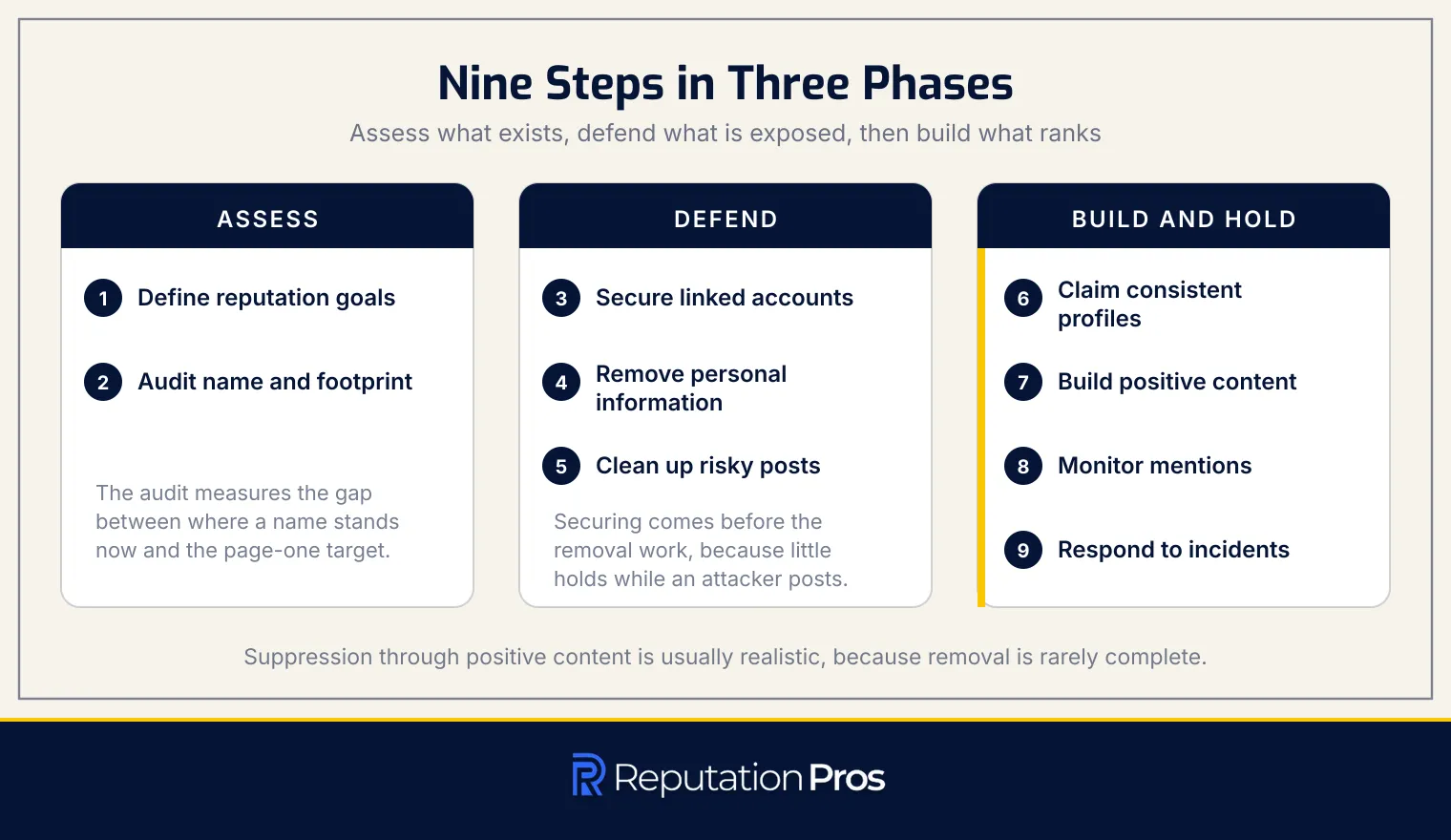
Employers, admissions officers, clients, and partners screen an online presence before deciding, which is what turns a search result into a real-world outcome. The sequence that protects it runs in order: define reputation goals, audit the footprint, secure accounts, remove unnecessary personal information, clean up risky posts, claim consistent profiles, build positive content, monitor mentions, and respond to incidents as they arise.
Four mechanisms carry the protection: privacy settings, accurate public profiles, published positive content, and monitoring tools. Where harmful information is already live, removal runs through platform reports, direct requests, and legal channels, and suppression through positive content is usually the more reliable path because removal is rarely complete. Digital identity, digital footprint, and reputation are three separate layers: you control the first, influence the second, and shape the third.
1. Define your online identity reputation goals
To define your online identity reputation goals, name the query you want to influence and the audience assessing it. Goals fall into three types: suppression, which pushes negative results down without removing them; removal, which eliminates harmful content at source; and reputation-building, which creates positive content that represents you accurately.
Exposure tolerance varies by profession. Executives and educators need tighter control over what a name search returns than creative professionals do, which changes how strict the later measures have to be. A measurable page-one outcome states the target plainly: a LinkedIn profile, a personal website, and published articles occupying the top results, with nothing negative visible.
Defined goals make the audit meaningful, because the audit measures the gap between where a name stands now and the page-one outcome the goals describe.
2. Audit your name and digital footprint
To audit your name and digital footprint, search your name logged out or in incognito mode across Google, Bing, and DuckDuckGo. Logged-out searching returns what an employer, admissions officer, or client actually sees, stripped of the personalisation that flatters your own results. Run name variants, and pair your name with your city, employer, and profession to surface results a bare name search misses.
A full reputation audit covers more ground than a name search alone. The images, news, and video tabs each need checking separately, because visual content and media mentions shift perception faster than text and surface independently of the main results. People-search listings need checking too: data brokers aggregate public records into pages exposing home addresses, phone numbers, and family connections, all without your participation.
Forgotten accounts on old forums, dating platforms, and defunct services still display outdated profiles. Content posted or tagged by other people, whether event photos, thread comments, or article mentions, counts toward your footprint as much as anything you published. Posted content is effectively permanent, since archives, caches, screenshots, and reposts survive the deletion of an original, which is why suppression through newer positive content is usually the realistic option rather than removal.
3. Secure accounts linked to your identity
To secure the accounts linked to your identity, give each one a distinct password held in a password manager and turn on multifactor authentication wherever the account anchors your identity. The primary email account matters most, because it is the master key for password resets and account recovery everywhere else. An authenticator app beats SMS codes, which SIM-swap attacks defeat, and recovery emails and phone numbers stay current so an attacker cannot capture the recovery path.
Account takeover leads directly to impersonation, where an attacker posts under your name and damages your reputation before you know the breach happened. The FBI’s Internet Crime Complaint Center recorded 859,532 complaints in its 2024 Internet Crime Report, with reported losses above $16 billion, a 33% rise on 2023, and personal data breaches ranked third among all reported crime types at 64,882 complaints. Cleaning up afterward is slower and less complete than preventing it, because the posts get archived and screenshotted while you are still regaining access.
Strong distinct passwords, a password manager, multifactor authentication, and verified recovery contacts together cut the risk of identity hijacking substantially. Securing accounts comes before the removal work, since removing exposed personal information achieves little while an attacker can still publish as you.
4. Remove unnecessary personal information
To remove unnecessary personal information, identify which sites list your details and submit opt-out requests to each. Home address, phone number, date of birth, and employer create the exposure that people-search sites and data brokers monetise, and the same details support identity theft, harassment, and unwanted contact.
Most people-search sites and data brokers publish opt-out forms on their privacy or help pages. The process differs by provider, with some accepting an email request and others requiring a form submission with identity verification, which means the work is per-broker rather than centralised.
Records reappear as brokers refresh their databases from public records, so the opt-out cycle repeats every three to six months to hold exposure down. Deleting or locking down the original source, usually a public social profile, reduces what flows back to the brokers in the first place, and a decision to delete your online presence outright removes the supply entirely. Opt-out, repetition, and source lockdown together shrink the personal-information surface that shapes what a name search returns.
5. Clean up risky posts and public profiles
To clean up risky posts and public profiles, audit your own posting history and manage what other people have attached to your name. The steps are listed below:
- Audit social media history: review past posts, likes, shares, and comments for content that colours a stranger’s judgment, including party and alcohol imagery, offensive language, and political rants.
- Identify damaging content: posts showing poor judgment, such as angry rants and offensive shares, carry the most weight, and spelling and grammar errors affect professional perception more than most people expect.
- Manage tagged content: untag yourself from photos and posts others have tagged you in, remembering that only the original poster can delete the content itself.
- Deactivate unused profiles: old and inactive accounts keep contributing to a footprint and resurface outdated material.
- Understand deletion limits: archived and screenshotted content persists beyond your control, which makes suppression through positive content the reliable move rather than deletion alone.
6. Claim consistent profiles and usernames
To claim consistent profiles and usernames, register the same handle across the major platforms and keep your name, photo, and bio aligned on each. Consistency builds an identity a stranger can verify, and registering first denies the handle to anyone who would misrepresent you under it. The steps are listed below:
- Use the same handle across platforms: one handle everywhere removes ambiguity about which account is yours.
- Keep name, photo, and bio consistent: aligned details across profiles read as one identity rather than several partial ones.
- Claim profiles before others register them: securing your name on the major networks forecloses impersonation and username squatting.
- Delete duplicate or inaccurate profiles: stale duplicates dilute search results and confuse anyone checking.
- Establish a professional network profile: a LinkedIn profile anchors a professional identity and ranks reliably for a name query.
- Create a personal website or portfolio: a site on your own name gives you a property no platform controls.
An absent or fragmented presence lets third-party pages define a name by default, which is the position every later step has to work back from.
7. Build trustworthy positive content
To build trustworthy positive content, publish assets optimised for searches of your own name so they outrank what you cannot remove. A personal website on your name works as the core asset, supported by a portfolio of your work and contributed articles on reputable platforms, which together give you direct control over what a search returns.
Volume and freshness decide whether those assets hold. One asset rarely holds page one alone; sustained volume and regular updates give owned properties the standing to keep their positions. Relevance decides which assets work: a graphic designer’s visual portfolio pieces earn their place where generic blog posts do not, and a consultant’s thought-leadership articles and case studies anchor the page instead.
Monitoring closes the loop, tracking whether published assets keep their rankings. Sustained updates keep a name associated with current work, which builds the perimeter that makes it harder for negative or irrelevant results to claim visible space, and that perimeter is what a trustworthy online personal presence amounts to.
8. Monitor mentions and search results
To monitor mentions and search results, set alerts on every name variant, including nicknames and professional titles, so nothing surfaces unwatched. Google Alerts covers basic indexed mentions, and mention-tracking tools such as Mention or Talkwalker Alerts extend coverage across social media and niche sites that Alerts misses.
Re-run the searches on a cadence matched to exposure. A high-profile name warrants weekly checks, and daily checks follow an incident. Review sites including Yelp and Glassdoor belong in the rotation, and the images and news tabs get tracked separately because visual and press results surface independently of text.
Monitoring reports what exists; management decides what to do about it. Reading an alert leads to a choice between publishing new content to suppress a result, requesting removal, or approaching the source directly, and the monitoring layer is what keeps earlier gains from quietly eroding. The ways and tools for monitoring online reputation set out that layer in full.
9. Respond to threats and reputation incidents
To respond to threats and reputation incidents, first decide whether responding helps at all. Not every negative comment warrants a public reply, and answering some of them amplifies reach that would otherwise have faded. Where content carries factual inaccuracies that could mislead an employer or a client, a measured correction earns its place.
Correcting a fact without escalating means evidence and calm language. Keep the reply brief, factual, and professional, since defensive or emotional phrasing invites the next round. A forum post misrepresenting your role in a project needs a short correction with supporting links, nothing more. Public arguments create a permanent record of conflict that damages a reputation regardless of who was right, so a conversation worth continuing moves to direct message or email.
Documentation comes before any of it. Harmful posts and defamatory reviews get edited or deleted before a report is filed, so capture full-page screenshots showing the URL, timestamp, and author, and store them where you can retrieve them for a platform report or a legal request. Speed matters most on a high-visibility incident, where the first hour covers documenting, reporting to the platform, and alerting the people who need to hear it from you first. A low-visibility issue leaves room to assess before acting.
What is online identity reputation?
Online identity reputation is how others perceive you based on your digital presence. That perception forms from a combination of what you publish, what others post about you, and how a reader interprets both. The digital footprint underneath it has two halves: what you share deliberately, such as social media posts and articles, and what is collected without any action from you, such as browsing history and tagged photos.
Online identity reputation carries weight because it is consulted before decisions are made. Employers, admissions officers, clients, and partners review what a name search returns, which converts a digital footprint into professional and personal outcomes. CareerBuilder’s 2017 study of hiring managers put social media screening at 70% of employers, and its 2018 follow-up found that 54% had come across content that led them not to hire a candidate.
Which search results shape your online identity reputation?
The search results that shape your online identity reputation are listed below:
- Page-one organic results: the top ten listings for your name, which carry the most visibility and set first impressions.
- Images tab results: photos attached to your name, which do the most damage when they contradict a professional image.
- News tab results: articles and press mentions, which readers treat as more credible than other results.
- Video tab results: interviews, presentations, and any video tagged with your name.
- Review and complaint listings: sites hosting public feedback, which rank prominently for many name queries.
- People-search listings: data broker pages aggregating public records and personal details.
- Third-party pages outside your control: forum posts and social mentions published by other people.
How do social media profiles affect your online reputation?
Social media profiles affect online reputation because most of them are public by default. Content shared or tagged by other people carries visibility past your immediate connections, reaching friends-of-friends and beyond. Privacy settings differ by platform, which is what determines how far any given post actually travels.
How do privacy settings protect online identity reputation?
Privacy settings protect online identity reputation by controlling who reaches your content. The settings govern who sees posts, who can tag you without approval, who can find your profile through a phone number or email address, and how visible historical posts remain. Reviewing them on a schedule matters because platform updates reset defaults, which exposes content that was private under the previous configuration. Actively managing those controls is what prevents unintended exposure to an employer, a client, or anyone searching your name.
Which accounts and credentials must you secure first?
The accounts to secure first are listed below, in priority order:
- Primary email account: the master key for password resets and account recovery everywhere else, where one compromise cascades into many.
- Financial and credit accounts: banks and credit cards, carrying the highest fraud and identity-theft exposure.
- Main social media accounts: Facebook and LinkedIn anchor a public identity, and unauthorised access produces impersonation.
- Professional network profile: usually the first result for a name, which puts professional credibility directly at stake.
- Secondary accounts: email aliases, forums, and subscription services, lower priority but still holding personal data and recovery links.
Recovery-chain logic sets that order: an account that can reset others gets protected before the accounts it can reset.
How do accurate public profiles protect online identity reputation?
Accurate public profiles protect online identity reputation by putting content you control into the results a stranger reads. Profiles carrying the same name, photo, bio, and role across platforms establish an identity that reads as authoritative, which is what lets them outrank third-party pages. Correcting outdated employment and location details keeps the picture current, since a stale profile invites the reader to guess.
An undefined name lets external sites define it. Consistent, current profiles occupy the positions those sites would otherwise hold, pushing less favourable content down, and uniformity across networks signals active management rather than neglect.
How does positive content protect online identity reputation?
Positive content protects online identity reputation by displacing negative results rather than deleting them. Content optimised for your name query, whether a personal website, a professional profile, or a contributed article, pushes unfavourable material down the page. Sustained volume and freshness outperform a single asset, because ranking systems weigh recency alongside relevance; Google states in its own documentation on how Search ranks results that freshness is one of the signals it applies, giving more recent pages weight where recency makes them more useful. Several authoritative pieces targeting the same name therefore defend it better than one, and the result is a page that reflects the professional identity you publish.
Which positive content improves your online identity reputation?
The positive content that improves your online identity reputation is set out below.
| Content Type | Ranking Power for a Name Query | Durability | Effort to Maintain |
|---|---|---|---|
| Personal website on your own name | Very high; a name-matched site is the strongest owned asset for a personal query and can anchor page-one visibility. | High; fully controlled, so it stays stable while it is kept updated. | Medium; needs periodic updates, technical upkeep, and content refresh. |
| Professional network profile | High; a complete, keyword-aware profile is commonly among the first to rank for a name search. | High; platform authority and consistent identity signals help it persist. | Low to medium; keep name, photo, role, and bio current. |
| Portfolio or project pages | Medium to high; they support the name query when topical, well-linked, and tied to the person’s field. | Medium; durable on stable domains that get refreshed. | Medium; needs new work samples, descriptions, and occasional updates. |
| Contributed or guest articles | Medium; they help when published on credible, topic-relevant sites and add third-party corroboration. | Medium; strong on reputable publications, though they age or get moved. | High; requires outreach, editorial approval, and ongoing publication. |
| Social profiles | Medium; useful for filling page one and reinforcing consistency, weaker than a dedicated site or major profile. | Medium; depends on continued platform activity. | Low to medium; consistent handles, bios, and occasional posting. |
| Press mentions and interviews | Very high; third-party coverage reinforces the name query and entity recognition. | High; coverage on reputable domains is long-lived and hard to displace. | High; depends on earning coverage rather than publishing it yourself. |
A name-matched personal website paired with a strong professional profile forms the resilient core, with the remaining types filling the page around them.
How do monitoring tools protect online identity reputation?
Monitoring tools protect online identity reputation by alerting on name variants and related keywords across the web. The tools track mentions, reviews, and sentiment, which surfaces a problem while it is still small enough to address. Re-check cadence follows risk, running daily for an exposed name and weekly for a lower-risk one. Google Alerts and mention-tracking platforms extend the watch to review sites and complaint forums. Monitoring stays passive by nature, and the value arrives only when someone acts on what it surfaces, whether by requesting removal or publishing content that outranks the finding.
How do you remove harmful information and recover from reputation damage?
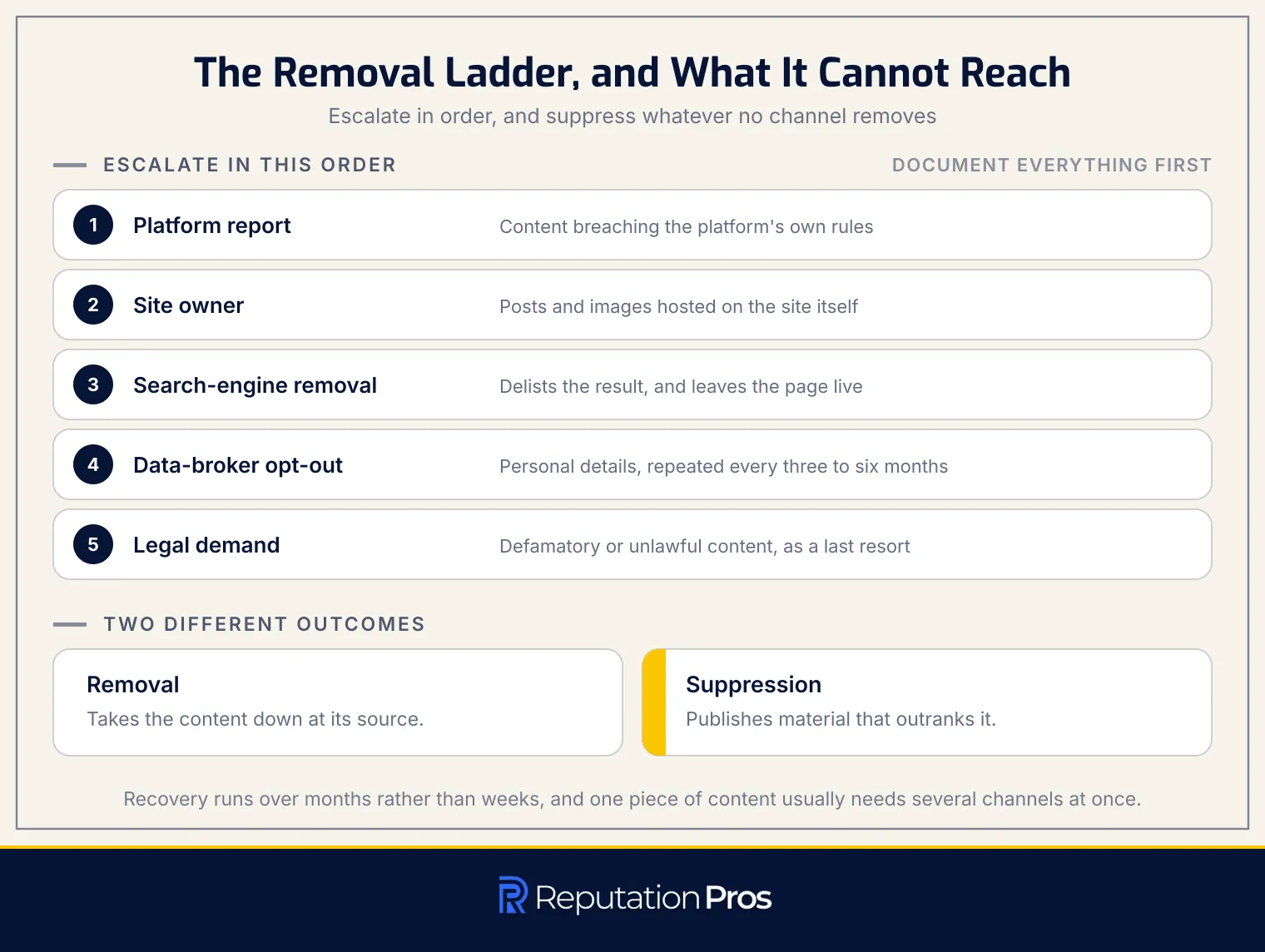
To remove harmful information and recover from reputation damage, document the evidence first, then escalate through the removal channels in order. Screenshots, URLs, and context get captured before anything is altered or removed, because that record supports every request and any legal action that follows.
Escalation starts with reporting the content to the platform hosting it. Where the platform refuses or stays silent, the site owner is the next approach. Where both fail, a search-engine removal request delists the result, which works best where the content breaches privacy or has gone stale. Legal demands such as a cease-and-desist letter are the last resort, reserved for content that is defamatory or unlawful.
Removal and suppression differ in what they achieve. Removal eliminates content from its source or from a search index; suppression pushes a negative result down by publishing material that outranks it. Recovery runs over months rather than weeks, and complete repair requires sustained work rather than a single intervention. Published timelines vary widely between providers and none rests on independent measurement, so treat any fixed figure as a sales estimate rather than a benchmark.
Which content removal channels can you use?
The content removal channels available to you are set out below.
| Channel | What It Can Remove | Who You Contact | Typical Response Time |
|---|---|---|---|
| Platform Report and Takedown | Content violating platform rules, such as harassment or copyright issues | The platform’s in-app reporting or trust-and-safety team | Days to weeks, depending on platform and claim severity |
| Direct Request to the Site Owner | Posts or images hosted on a website | Website owner, webmaster, or site administrator | Days to weeks, varies by owner response time |
| Search-Engine Removal Request | Search results carrying personal or outdated information | Search engine’s removal request form | Days to weeks; some requests are reviewed faster |
| Data-Broker and People-Search Opt-Out | Personal data such as address and phone number from aggregator sites | Each broker’s opt-out form | Days to weeks; requires periodic repetition |
| Legal Demand | Defamatory or unlawful content not removed by other means | Lawyer or formal legal notice to host or publisher | Slower than standard requests; depends on the legal route |
These channels run independently, and the same piece of content usually needs several pursued at once.
How does digital identity relate to online reputation?
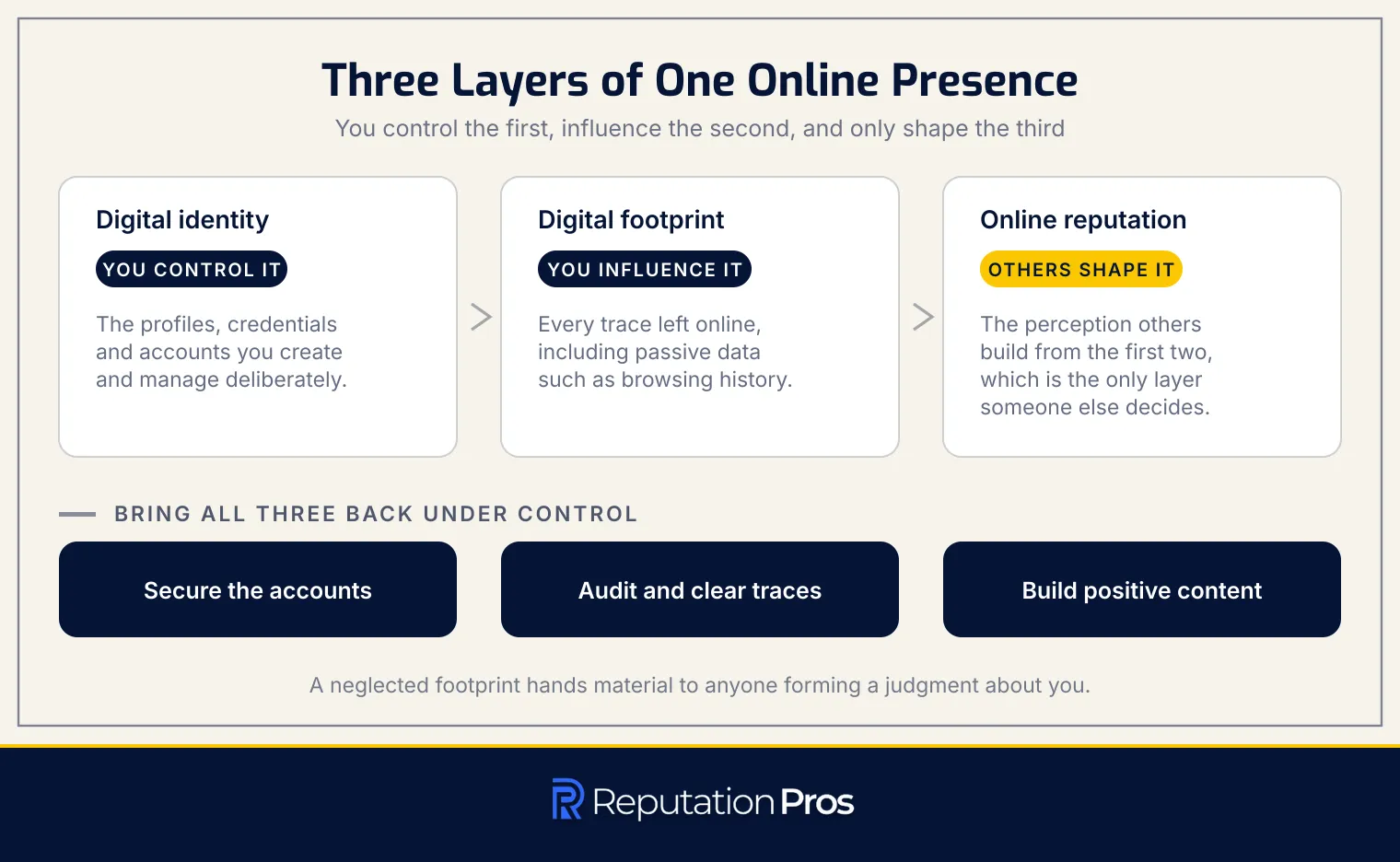
Digital identity, digital footprint, and online reputation are three layers of one online presence. Digital identity is the set of profiles, credentials, and accounts a person creates and manages deliberately. Digital footprint is every trace left online, covering shared content alongside passive data such as browsing history and cookies. Online reputation is the perception others build from the first two, which makes it the only layer shaped by someone else.
A neglected footprint widens exposure, putting personal details within reach and handing material to anyone forming a judgment. Securing accounts, auditing and clearing traces, and building positive content are what bring the three layers back under deliberate control.
How does online reputation management protect digital identity?
Online reputation management protects digital identity through a repeating cycle: audit, set goals, monitor, respond, build, review. Running that cycle is what keeps control over how a name appears in search results and public records.
Reputation management combines defensive and proactive work. Defence covers securing accounts and removing exposed personal information. Proactive work covers publishing accurate, positive content, where suppression outranks unwanted material and removal eliminates it through a takedown or a legal channel.
Cycling through those steps prevents damage, corrects inaccuracies, and builds a footprint that reflects deliberate choices rather than abandoned profiles and third-party pages. The self-managed cycle handles routine maintenance and moderate threats, and it reaches its limit against persistent, defamatory, or high-volume content.
When should you use professional reputation management help?
Use professional reputation management help when the severity or volume of harmful content exceeds what self-service can reach. Four conditions mark that threshold: defamatory results that hold page one despite sustained suppression, doxxing that exposes a home address or phone number, impersonation through fake profiles that damages credibility, and a coordinated attack producing more negative content than one person can answer.
Each of those involves work that self-service methods do not cover, whether legal process, high-volume takedowns across many hosts, or the sustained publishing required to displace entrenched results. Reputation Pros handles that work alongside the monitoring that catches recurrence, which is where a self-managed cycle hands over.