How to Check If You Have Nudes of Yourself Online
 21 min read
 On this page
To check if you have nudes of yourself online, search your own identifiers, reverse-image search your face, and check the platforms that host reposts. An intimate image of yourself online is any nude, partially clothed, or sexually explicit depiction of you, including AI-generated ones, and being exposed is not your fault.
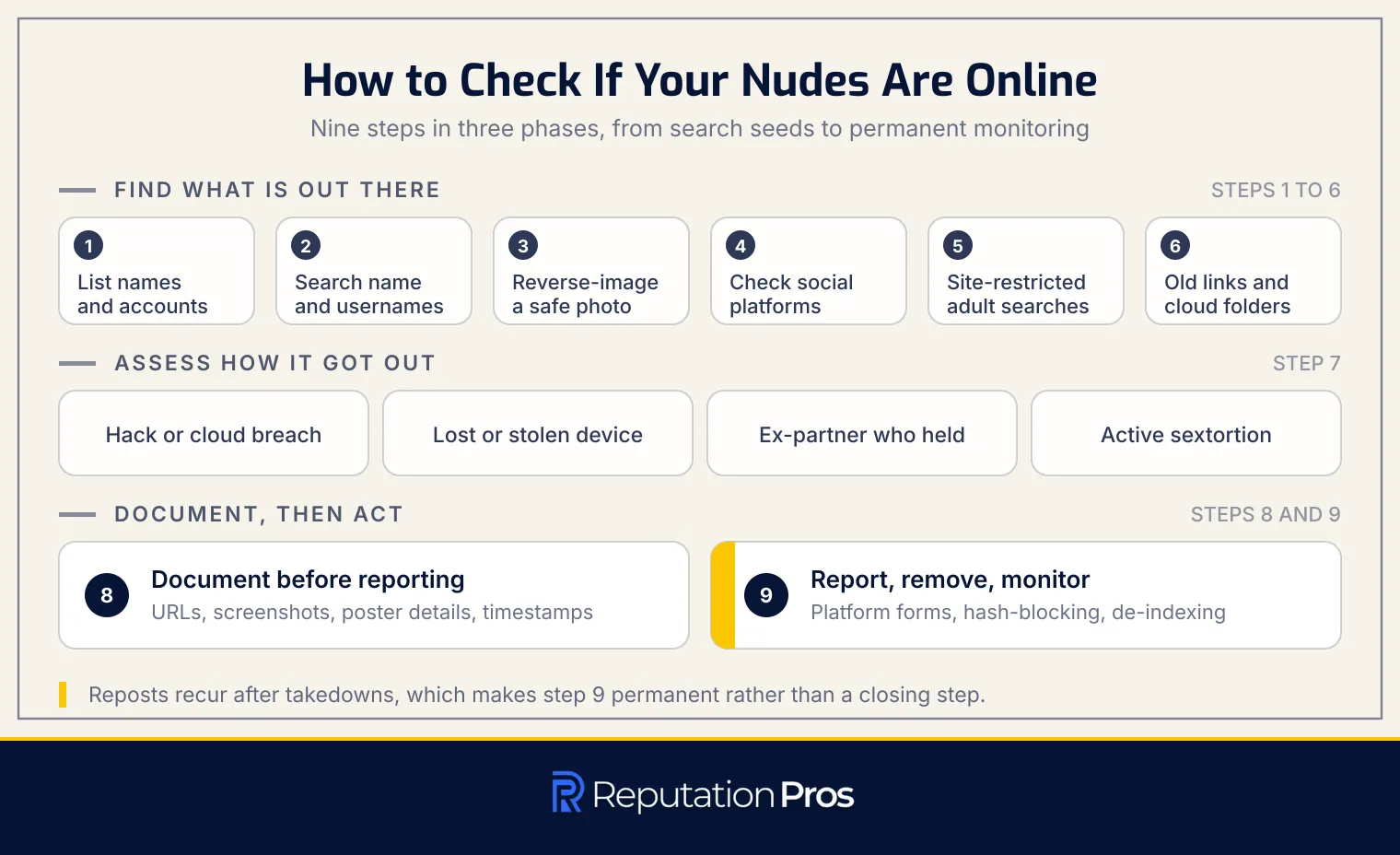
The search runs as a sequence. Gather every name and account you have used, search those identifiers on search engines, reverse-image search with safe reference photos, check social and community platforms, run site-restricted searches against adult and image-hosting sites, and review old links, cloud folders, and shared albums. Four situations change how the search runs: a hack or cloud breach, a stolen device, an ex-partner who held images, and an active sextortion threat.
Anything you find gets documented before it gets reported. Reporting then runs across platform forms, hash-blocking services, search-engine removal, and law enforcement, with monitoring afterward because reposts recur. The knowledge that sits alongside the steps covers what counts as an intimate image, which identifiers work as search seeds, how reverse-image matching works, which platforms host reposts, what evidence to save, and how hash-blocking stops re-uploads. Searching carries its own risks, which is why private searching, account security after exposure, and the repair of reputation damage all belong in the same sequence. Set expectations accordingly: material can be taken down and de-indexed, reposts still recur, and monitoring continues. Everything starts with how complete your list of names and accounts is.
1. List every name and account you have used
To assemble a complete identifier list, write down every name and account that has ever pointed at you online. The list becomes the set of search seeds every later step runs on, so gaps in it become blind spots in the search.
The identifiers to collect are listed below:
- Legal name and any maiden or former names
- Nicknames and variations of your first name
- Usernames and handles from current and dormant platforms
- Old email addresses and phone numbers
- School and employer context tied to any of those accounts
Once the identifier list is complete, each entry becomes a search seed to type into a search engine.
2. Search your name and usernames on search engines
To search your name and usernames on search engines, run each identifier in exact-phrase quotes, then again combined with modifiers. Quoting a full name or username forces an exact match instead of a loose one. Site modifiers narrow a search to one platform, in the form “your name” site:reddit.com. Explicit-term modifiers surface the results that matter here, in the form “your name” nude or “your username” leaked.
The Images tab on each engine surfaces visual content that the web results miss. Run the same queries across Google, Bing, DuckDuckGo, and Yandex, because each indexes and filters differently, and read several result pages down, since reposted material sits below the first page far more than it sits on it.
Standing alerts turn a one-time search into monitoring. Set an alert on each identifier through Google Alerts or Talkwalker Alerts, so new content carrying your name reaches you rather than waiting for your next manual search.
3. Run reverse-image searches with safe reference photos
To run reverse-image searches with safe reference photos, use a well-lit, front-facing photo of your face as the probe rather than any intimate image. A clothed reference photo works because the matching engines read your face, not the rest of the frame.
Reverse-image search runs on two methods. File-matching compares an image’s digital fingerprint against indexed copies, and it fails once an image has been cropped, mirrored, or re-compressed. Face-recognition search reads facial features and finds visually similar faces even after edits, which makes it the stronger method for reposted material.
Coverage varies by engine, so the probe goes through several. Google Lens and Bing Visual Search give broad coverage, Yandex indexes sites Western engines routinely miss, TinEye tracks exact copies through a long historical index, and PimEyes runs facial recognition across sites general engines exclude. Repeating the search with several reference photos at different angles and lighting raises the hit rate, because each photo works as a fresh probe.
4. Check public social media and community platforms
To check public social media and community platforms, search your usernames and name variants on each one, review tagged posts and mentions, and check archived and cached copies before using the in-platform report route.
The platform-by-platform routes are listed below:
- Reddit: search your username and name variants and check subreddits known for reposting intimate content; report through “Other issues” under “Involuntary Pornography.”
- X: search your handle and name and check mentions and quote posts; report under “Private information,” selecting “Intimate photos or videos.”
- Instagram: search your username and tagged posts and review story highlights and archived stories; report under “Nudity or sexual activity,” selecting “Shares private images.”
- Facebook: search your name across public posts and check tagged photos and videos; report under “Nudity,” selecting “Shares private sexual images.”
- Snapchat: review chat threads that may hold saved media; report under “Harassment & bullying” or “Nudity & sexual content.”
- TikTok: search your username and name across videos and comments and check duets and stitches; report under “Privacy and safety,” selecting “Intimate images.”
- Tumblr: search through Tumblr’s own search and through a site-restricted Google search; report under “Revenge porn.”
- Discord: search within servers and check pinned messages and media channels; report to Trust & Safety under “Harassment” or “Private information.”
- Imgur: search your username and reverse-image search your photos through Imgur; report under “Involuntary pornography” or “Harassment.”
- Kik: check public groups listed in third-party Kik group directories; report through Kik’s safety reporting email.
- YouTube: search your name and usernames and check descriptions and comments; report under “Sexual content,” selecting “Non-consensual sexual content.”
Document every instance before you report it, because platforms remove content quickly and the proof is what later hash-blocking and legal submissions run on.
5. Search adult sites and image-hosting sites cautiously
To search adult sites and image-hosting sites cautiously, use site-restricted search operators from a search engine instead of browsing those sites directly. Searching from outside keeps you off the page, which limits exposure to explicit content, malware, and tracking.
Site-restricted search operators. Queries in the form site:sitename.com “your name” or site:sitename.com yourusername search inside one domain without visiting it. Where a match appears, capture the URL and screenshot the results page, recording the domain and the date.
Risks of direct browsing. Creating an account on an adult site or image host exposes personal information to phishing, malware, and scams. Many such sites run deceptive paywalls and fake removal services that take a fee and remove nothing. Direct engagement ties your identity to the platform, which raises extortion and data-leak risk.
Continuous monitoring and reporting. Repeat the site-restricted searches across the platforms you have identified, and set search alerts to keep them running. Hash-blocking services, StopNCII.org and Take It Down, block re-uploads. Where a match appears, removal runs through search-engine de-indexing forms and complaints to the site’s host or registrar, and never through direct contact with the site itself.
6. Review old links, cloud folders, and shared albums
To review old links, cloud folders, and shared albums, audit everything you have ever shared or backed up rather than only what you remember sharing. Check permission settings on shared albums in Google Photos, iCloud Shared Albums, OneDrive, and Dropbox, where albums set to “shared with specific people” get switched to “anyone with the link,” and where links sent in private messages get forwarded onward. Review every share link you have generated, including unlisted ones, because an unlisted link works for anyone who holds the URL and those URLs surface in browser history and public forums.
Cloud auto-backup folders come next, because they hold images you believed were stored only on a device. Google Photos, iCloud, OneDrive, and Samsung Cloud upload camera roll content by default, and those folders stay reachable through share links and through web sessions still signed in on an old device. Check whether auto-backup is enabled, what it has uploaded, and whether any of those folders have been shared.
Old messaging threads on WhatsApp, Telegram, Snapchat, Instagram, Facebook Messenger, Kik, and Discord hold media you believed had expired. Recipients save, screenshot, and export media before it disappears, and some services keep expired content in cached folders, device backups, and cloud message sync. Open the threads and verify what still exists, what a recipient saved, and what was backed up to cloud storage or a linked device.
Third-party apps connected to your Google, Apple, or Facebook accounts close the audit. Revoke access for any service you no longer use or recognise, above all photo editors, face-filter apps, collage makers, and vault or hidden-photo apps that requested camera roll or cloud storage permission. Those apps retain copies on their own servers, and a policy change, an acquisition, or a breach can expose them without your knowledge. Log every revocation and deletion request in your evidence record.
7. Check for exposure after a hack, theft, breakup, or sextortion
To check for exposure after a hack, theft, breakup, or sextortion, start from the account or the person that had access and work outward. Review login history and connected devices across email, social media, and cloud storage, looking for unfamiliar IP addresses and devices. Have I Been Pwned shows whether your email appears in known breaches, because a compromised credential opens a cloud library or a messaging archive.
Where a device was stolen, lost, or sent for repair, treat any image stored locally or held in a recently used app as potentially exposed. Where an ex-partner held intimate images, check their current and former usernames on the platforms they use, and review shared albums, messaging threads, and cloud folders whose access was never revoked when the relationship ended.
An active sextortion threat, where someone demands payment or further images to withhold intimate content, changes the response. Never pay and never negotiate. The FBI states in its 2021 public service announcement “FBI Warns about an Increase in Sextortion Complaints” that it does not condone paying an extortion demand, because the money funds further criminal activity, and that victims should stop all interaction with the extortionist and report to the Internet Crime Complaint Center at ic3.gov. Document every threat message, with the sender’s username, profile details, email address, and phone number, and screenshot every exchange for law enforcement and platform reports.
8. Document any intimate images before reporting them
To document intimate images before reporting them, preserve the evidence first and attempt removal second. The evidence record proves the violation happened, carries the technical details platforms and law enforcement need to locate the content, establishes a timeline once reposts appear, and protects you if the imagery comes down before anyone official has seen it.
Capture the full URL of every page holding the image, copied from the address bar rather than reconstructed from memory. Take a full-page screenshot showing the URL, the image or a cropped version that confirms the match without re-exposing you, the page layout, and the visible date. Record the poster’s username and profile, covering display name, handle, profile URL, bio, and other posted content that identifies them or establishes a pattern. Note the upload timestamp as it appears, whether an exact date and time or a relative marker such as “posted 3 days ago.” Save any post or copy IDs from the URL or page source, since platforms use them to track an upload across mirrors and reposts.
Where the exposure involves threats, extortion, or contact from the person who posted the imagery, preserve every message with sender identifiers, timestamps, and full text. Keep all of it in a secure, organised log, a password-protected document or encrypted folder updated each time you find a new post. Do not re-download the imagery: the URL and the screenshot are sufficient proof, and downloading adds legal risk and further harm.
A completed evidence record unlocks every removal route at once. Platforms get the post identifiers they need to process a takedown, search engines get exact URLs to de-index, law enforcement gets the documentation to open a case, and you get the reference trail for when the same imagery reappears elsewhere.
9. Report, remove, and monitor intimate images
To report, remove, and monitor intimate images, run the removal routes in parallel and keep monitoring after they succeed. Platform NCII report forms come first, and Facebook, Instagram, X, Reddit, and TikTok each provide a dedicated pathway for intimate imagery shared without consent.
Hash-blocking services run alongside the platform reports. StopNCII.org covers adults aged 18 and over and Take It Down covers images created when the person was under 18. Each generates a digital fingerprint of the image on your own device without the image itself leaving it, and participating companies use that fingerprint to block future uploads.
Search-engine removal is a separate route from platform removal. Google’s removal tool for personal explicit imagery de-indexes pages carrying your intimate images from search results. Where a platform does not respond, the hosting provider or domain registrar can be reached through the abuse or DMCA contact in the site footer or through a WHOIS lookup. A police report creates an official case number, which strengthens removal requests and satisfies the platforms and search engines that require proof of a criminal complaint. Imagery of anyone under 18 goes to the National Center for Missing & Exploited Children’s CyberTipline.
Set expectations on what removal achieves. Platforms and search engines take down and de-index reported content, and reposts recur as copies migrate between sites, cached versions persist, and fresh uploads appear on mirror domains. Set a repeat cadence: run the same identifier and reverse-image searches on a weekly or fortnightly schedule, check alerts as they arrive, and confirm your submitted hashes remain active. Removal from one platform does not prevent reappearance on another, which is what makes monitoring a permanent part of the process rather than a closing step.
What are Nudes material of Yourself Online?
Nude material of yourself online is any nude, partially nude, or sexually explicit image or video of you that appears on the internet without your consent. Such material originates from personal captures shared privately, from unauthorised recordings, and from AI-generated depictions built through digital manipulation. Whether an image is real or synthetic, the harm lies in its unauthorised publication, and that harm is never the victim’s fault.
Material reaches the internet through several routes: shared onward by someone trusted, stolen in a device or cloud breach, or created maliciously from existing photos. Distribution then spreads across social media, adult websites, and file-sharing services, which is what makes the scope of the exposure worth establishing early.
What counts as an intimate image online?
The content that counts as an intimate image online is listed below:
- Nude imagery: full or partial nudity of genitals, breasts, or buttocks.
- Partially nude and underwear imagery: photos in underwear or swimwear revealing substantial skin.
- Implied imagery: frames where clothing is removed or positioning suggests nakedness.
- Sexual activity: photos or videos of sexual acts, solo or with others.
- Video and screenshots: recorded clips, video calls, and screenshots taken during video chats.
- Screen-recorded livestreams: recordings from platforms such as Instagram or Snapchat capturing states of undress.
- Consensual images shared without consent: material created consensually and then shared without permission.
- AI-generated depictions: synthetic images and deepfakes that digitally alter or fabricate explicit content.
What is the difference between a real leak and an AI-generated deepfake nude?
The difference between a real leak and an AI-generated deepfake nude is the origin of the image, not its legal standing. A real leak is an actual photo or video captured by a camera or a screen and shared without consent. An AI-generated deepfake nude is synthesised by software that manipulates an existing image to fabricate nudity. Detection cues for a deepfake include mismatched face boundaries, anatomical inconsistencies, and lighting that does not match across the frame.
Both types run through the same reporting and removal routes. Federal law makes that explicit: the TAKE IT DOWN Act, signed on 19 May 2025, covers AI-generated “digital forgeries” alongside authentic imagery and requires covered platforms to operate a notice-and-removal process that acts within 48 hours of a verified request.
Which identifiers can help find intimate images of you?
The identifiers that help find intimate images of you are listed below:
- Name variants: full legal name, maiden and former names, nicknames, and common misspellings, which surface profile pages, tagged posts, and mentions where a name sits alongside an image.
- Usernames and handles: current and past usernames, screen names, and handles across social media, forums, and messaging services, which surface reposts tagged with a handle and tribute accounts built on it.
- Email addresses: old and current addresses, which surface account registrations, cached profiles, and forum posts where an address was visible.
- Phone number: searched with and without country code and in several formats, which surfaces messaging app profiles and account recovery pages.
- Profile photos for reverse-image search: clear, well-lit, front-facing photos uploaded to Google Lens or TinEye, which find visually similar images even after cropping or modification.
- Visual identifiers: distinctive tattoos, piercings, and recurring background details, which confirm an image depicts you and lead to further posts and accounts.
How do reverse-image searches find intimate images?
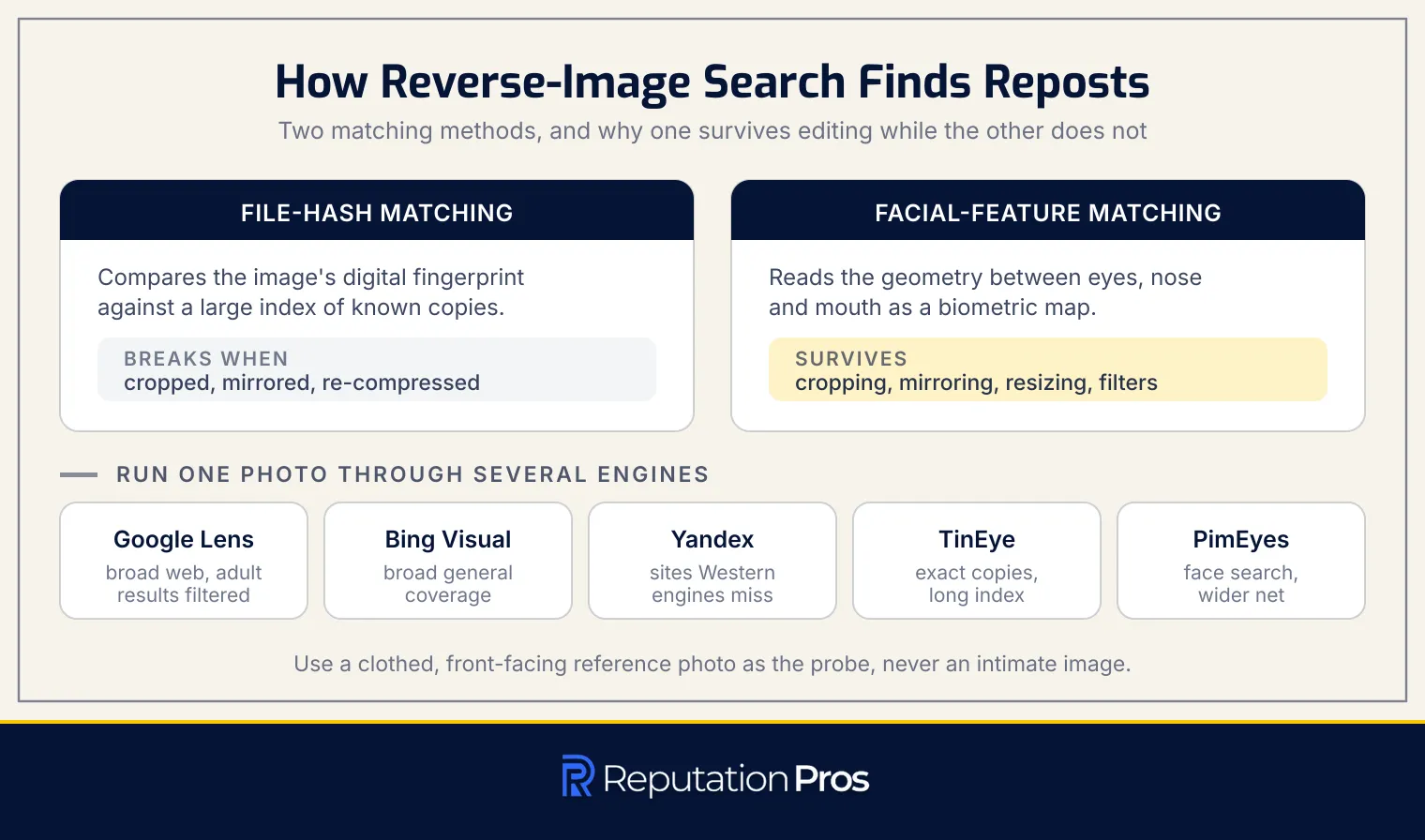
Reverse-image searches find intimate images through two matching techniques: file-hash matching and facial-feature matching. File-hash matching compares an image’s digital fingerprint against a large index to find exact or near-exact copies, and it breaks once an image has been cropped, mirrored, re-compressed, resized, or filtered, all of which happen routinely during reposting. Facial-feature matching reads the geometric relationships between facial landmarks such as the eyes, nose, and mouth and builds a biometric map that survives those alterations.
Index coverage differs across services. Google indexes a broad range of public web pages and filters adult content out of standard image results. Yandex indexes Eastern European and Russian-language platforms that Western engines miss. TinEye specialises in file-hash matching across a long historical index, which makes it effective at finding the earliest upload of an image. PimEyes runs facial-feature recognition alone and indexes sites general engines exclude. Running one reference photo through several engines raises the chance of finding reposted or altered material, because each service crawls a different part of the web.
Which platforms are most likely to host reposted intimate images?
The platforms most likely to host reposted intimate images are listed below, with the reporting route for each.
| Platform or Site Type | Why Reposted Imagery Ends Up There | Report Route |
|---|---|---|
| Repost-heavy forums and community boards | Dedicated sections for leaked content, user-submitted galleries, and archived threads that persist after deletion. | In-platform report form, moderator contact, or admin abuse email. |
| Adult tube and gallery sites | High traffic for explicit content and user-upload sections optimised for name searches. | DMCA takedown form, NCII-specific report options, or the abuse team. |
| Image hosts and file lockers | Free anonymous uploads, direct-link sharing, and minimal review before publication. | Host abuse-report form, provider contact, or a registrar complaint where the content persists. |
| Messaging channels | Private and semi-private Telegram and Discord groups enable peer-to-peer sharing with little oversight. | In-app reporting, server administrators, or the platform’s trust and safety team. |
| Mirror and aggregator domains | Scraped content from primary hosts, re-uploaded after takedown across multiple domain variants to evade removal. | Registrar report, search-engine de-indexing request, and notice to the upstream host. |
Reposts migrate between hosts after each takedown, which is what makes monitoring across all five types continuous rather than occasional.
What evidence should you save when you find intimate images?
The evidence to save when you find intimate images is listed below:
- Full URL: the exact web address where the image appears, which identifies the content precisely in a takedown request.
- Screenshot showing URL and date: proof the image existed at a given moment, on a given page.
- Poster username and profile: the uploader’s username and profile details, which establish who posted it and whether a pattern exists.
- Upload timestamp: the date and time as displayed, which builds the timeline.
- Post or copy IDs: identifiers embedded in the URL or page source, which platforms use to track an upload across mirrors.
- Preserved threat or extortion messages: complete messages with sender identifiers and timestamps, kept intact rather than summarised.
- Secure log: all of the above consolidated in an encrypted folder or password-protected document.
A detailed record is what makes both removal requests and any later legal action workable.
How do you report and remove non-consensual intimate images?
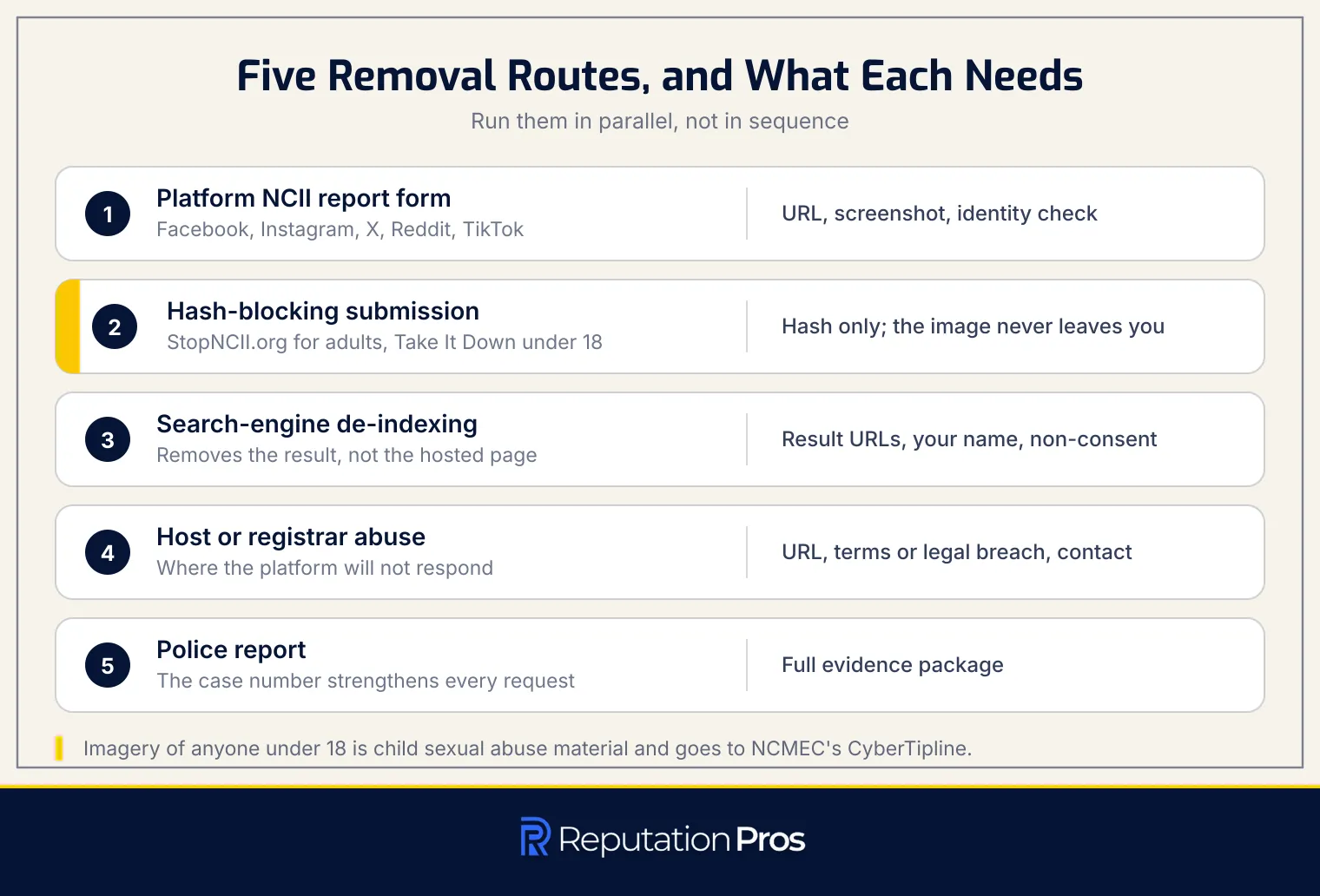
To report and remove non-consensual intimate images, run five routes, each with its own proof requirements.
In-platform NCII report form. Facebook, Instagram, and the other major platforms provide dedicated NCII forms. A submission carries the full URL of the content, a screenshot for context, and identity verification. Major platforms move faster on these than smaller and adult sites do.
Hash-blocking submission. StopNCII.org and Take It Down block re-uploads through hashing. StopNCII.org confirms in “How StopNCII.org Works” that the hash is generated from the file on your own device and only that hash is sent, so the image itself never leaves your possession, and participating platforms then remove content matching it under their intimate image abuse policies.
Search-engine de-indexing request. Google and Bing accept de-indexing requests for non-consensual imagery. A request carries the URLs of the search results, your name as it appears in the search, and confirmation that the sharing was non-consensual. Google notes in “Remove my private info from Google Search” that it can only remove material from its own results, and that content removed from Search may still sit on the internet and be reachable through links, social media, or another engine, which is why the host route runs in parallel.
Host or registrar abuse contact. A hosting provider needs the full URL, evidence of a terms-of-service violation or legal breach, and your contact details. Response times vary widely by host.
Police report and legal action. A police report needs the full evidence package: URLs, screenshots, and poster identifiers. The report creates a legal record and strengthens every removal request that follows.
Non-consensual sharing of intimate images is illegal, and any imagery of a person under 18 is child sexual abuse material, which changes both the reporting route and the urgency.
How do StopNCII.org and Take It Down help block re-uploads?
StopNCII.org and Take It Down block re-uploads through hash matching. Each service generates a hash, a digital fingerprint, from the image on your own device, and only that hash is transmitted, so the image itself never leaves your possession. Participating technology companies then match incoming uploads against the hash and remove what matches under their intimate image abuse policies.
Eligibility splits by age at the time the image was made. StopNCII.org serves adults and requires that the person depicted was over 18 in the image, according to its own “How StopNCII.org Works” documentation. NCMEC’s Take It Down assigns a hash value to nude, partially nude, and sexually explicit images of people under the age of 18, and directs anyone whose image was taken at 18 or older to StopNCII.org instead.
What are the risks of searching for your own nudes?
The risks of searching for your own nudes are listed below:
- Malware and scam sites: adult and image-hosting sites carry malicious software and phishing schemes built to infect devices and harvest personal data.
- Paid removal scams: operators post intimate images and then route victims to a second site demanding payment for removal. The FBI warned in its 2023 announcement “For-Profit Companies Charging Sextortion Victims for Assistance and Using Deceptive Tactics to Elicit Payments” that victims should never have to pay a fee to have non-consensual images removed.
- Search trail on shared devices: searches leave a record in browser and search history, which exposes the situation to anyone else using the device.
- Alerting the poster: viewing content on some platforms registers your visit or notifies the uploader, who then reposts elsewhere or escalates.
- Re-traumatisation: encountering the imagery repeats the violation, and the cumulative effect of repeated searching is worth planning for.
- Handing probe images to third-party services: uploading reference photos to unregulated face-search platforms surrenders biometric data and creates a fresh privacy risk.
Knowing the risks is what makes the precautions in the next section worth taking before the next search.
How can you search for intimate images privately?
To search for intimate images privately, separate the search from your everyday identity and devices. The steps are listed below:
- Use private browsing or a separate account: keeps the search out of your regular history and away from a signed-in profile.
- Search on a personal device: work and shared devices carry logging and other users.
- Enable a VPN: masks your IP address, which matters on the platforms that register visitors.
- Log out of platform accounts: prevents a platform from tying the search to your profile.
- Avoid uploading photos to unknown services: face-search services that store probe images create the new exposure the search was meant to close.
How can you secure your online accounts after exposure?
To secure your online accounts after exposure, close the access routes before repairing anything else. The steps are listed below:
- Change passwords immediately: create strong, unrepeated passwords in a password manager, starting with email, cloud storage, and social media.
- Enable two-factor authentication: activate app-based two-factor authentication on every account that supports it.
- Review and revoke third-party access: remove any connected app you no longer use or do not recognise.
- Check login activity: review recent sign-ins and end any session you do not recognise.
- Update recovery information: confirm recovery email addresses and phone numbers are current and under your control.
- Enable login alerts: set notifications for new sign-ins so unauthorised access surfaces immediately.
- Audit privacy settings: restrict who can see your information across social media and cloud accounts.
- Consider new accounts: where an account is heavily compromised, build a fresh one and migrate the data across.
How can you reduce future intimate-image leaks?
To reduce future intimate-image leaks, limit what exists, control where it is stored, and secure the accounts that hold it. The measures are listed below:
- Disable cloud auto-backup: turning off automatic photo and message backup stops unintended uploads.
- Use disappearing messages: enable disappearing messages and screenshot alerts where a messaging app offers them.
- Exclude identifying details: keep faces, tattoos, and other identifying features out of frame.
- Share only with trusted people: discuss privacy expectations before sharing, not after.
- Store securely: keep intimate images in an encrypted, password-protected vault rather than the standard gallery.
- Audit app permissions: review and revoke app access to photo libraries and cloud storage on a schedule.
- Strengthen account security: strong, unrepeated passwords and two-factor authentication across every account.
- Restrict partner storage: intimate images stay off other people’s devices.
- Avoid unknown AI and face-recognition services: photos uploaded to them may be retained indefinitely.
What is the impact of Nudes Material of Yourself Online impact your Reputation?
Nude material of yourself online damages your reputation by attaching itself to searches for your name. Images that surface against your name affect employment, education, and personal relationships, and their visibility during a background check by an employer or an institution costs opportunities directly. The psychological impact runs alongside the practical one, producing anxiety, depression, and social withdrawal.
Persistence is what turns a single exposure into ongoing damage. Removed images get reposted, which repeats the exposure and forces continuous management of a digital presence that most people never expected to manage. The scale of the problem is measurable rather than anecdotal. A 2016 Data & Society Research Institute study by Amanda Lenhart, Michele Ybarra and Myeshia Price-Feeney, “Nonconsensual Image Sharing: One in 25 Americans Has Been a Victim of ‘Revenge Porn’,” found that 4% of internet users in the United States have had sensitive images posted without permission or been threatened with it.
How to fix your Online reputation after exposed Nudes of Yourself Online?
To fix your online reputation after exposed nudes of yourself online, remove what can be removed, secure what remains, and rebuild what people find instead.
1. Request removal from search engines. Submit a personal explicit imagery removal request to Google and the other major engines, supported by the URL documentation gathered during evidence collection.
2. File takedown requests with hosting platforms. Use each platform’s NCII report form, supplying URLs, screenshots, and timestamps that establish the content depicts you without consent.
3. Submit imagery to hash-blocking services. Register with StopNCII.org as an adult, or Take It Down for images created when you were under 18, so participating platforms block re-uploads before they publish.
4. Create accurate content under your real name. Publish professional profiles, articles, and social content that ranks for your name, which gives search engines accurate material to rank.
5. Optimise your professional online presence. Update LinkedIn, a personal website, and professional directories with current information, so those pages outrank older material.
6. Request removal of cached and archived copies. Submit removal requests to web archives including the Internet Archive’s Wayback Machine, because cached copies survive the removal of the original page.
7. Monitor search results continuously. Run Google Alerts alongside manual searches on your name, usernames, and image variations, so a re-upload surfaces while it is still new.
8. Suppress remaining links. Contribute to high-authority websites, blogs, and news outlets to build enough accurate results to push down what cannot be removed.
9. Adjust privacy settings across all platforms. Lock down social profiles, remove unauthorised tagged photos, and restrict who can tag or post to you.
10. Report to law enforcement where applicable. File a police report where the sharing was non-consensual or involved imagery of you under 18; the case number strengthens removal requests and can lead to charges.
11. Secure all accounts with strong authentication. Change passwords, enable two-factor authentication, and review connected apps and devices, revoking anything with access to your photos or cloud storage.
12. Request link removal from aggregator and gossip sites. Contact the webmasters of sites republishing or linking to the imagery, providing proof of non-consent and the legal grounds in your jurisdiction.
13. Use legal letters where direct requests fail. Have an attorney send cease-and-desist or DMCA notices to platforms and individuals who refuse removal.
14. Build a narrative that reclaims your story. Where the exposure is widely known, work with a counsellor or a communications professional on a brief, dignified response that names the violation without supplying details.
15. Document every action you take. Log every removal request, response, takedown confirmation, and re-upload found, which evidences sustained effort and supports later legal or reputation work.
Self-managed repair continues until the scale of re-uploads, the silence of a platform, or the difficulty of suppressing what remains makes outside help the faster route.
How does a Reputation management agency help you protect your online reputation?
A reputation management agency protects your online reputation by running removal, suppression, and monitoring as a continuous operation rather than a one-time cleanup. At Reputation Pros, we monitor search engines and social platforms for re-uploads of intimate imagery, and we file removal and de-indexing requests against each one as it appears. Suppression runs alongside removal, raising accurate, authorised content above whatever negative results survive against a client’s name.
Ongoing protection is where a reputation management agency differs most from self-managed repair. We maintain the watch after the first cleanup, adapt as new threats surface, and carry the repeat-search cadence that exposure makes permanent, which is the same cadence the earlier steps in this article establish for anyone checking on their own.